
Reviews
Vos graphiques ajoutent une belle touche à mes présentations et je les ai récemment utilisés pour l'une de mes réunions générales. Votre boîte à outils ajoute du professionnalisme à mes diapositives. Au lieu d'utiliser des cliparts standards.
J'avais besoin d'un nouveau regard sur certaines de mes diapositives. J'ai essayé de trouver un moyen de créer un effet de pinceau, de souligner, d'accentuer, d'ajouter de la couleur et les marqueurs manuscrits étaient exactement ce qu'il fallait. Très facile à utiliser, facile à ajuster la taille, à changer la couleur. C'était une solution abordable et parfaite et je suis heureux de la recommander.
L'aspect net et épuré des graphiques, et le fait qu'il m'ait permis d'éditer et de changer facilement les couleurs pour les adapter au modèle, ont été les principales raisons de mon achat.
Description
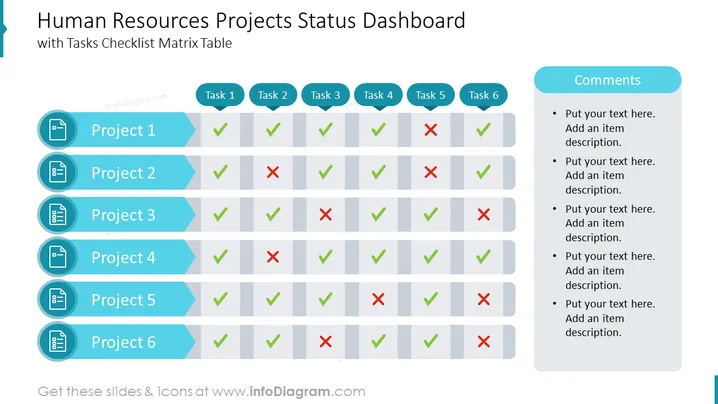
Human Resources Projects Status Dashboard with Tasks Checklist Matrix Table
Slide Content:
- Human Resources Projects Status Dashboard: A visual representation of the status of all human resources projects, including key metrics such as progress, budget, and timeline.
- Tasks Checklist Matrix Table: A table that lists all of the tasks associated with each human resources project, along with their status, due date, and assigned person.
Graphical Look:
The slide has a simple and professional design, with a white background and blue and green text. The title of the slide is displayed in a large, bold font, and the tasks checklist matrix table is displayed in a smaller, more compact font. The table is divided into columns for the project name, task name, status, due date, and assigned person. Each column is labeled with a clear and concise heading.
You can use the following icons to show these concepts:
- Green checkmark icon: Indicates that a task is complete.
- Yellow exclamation point icon: Indicates that a task is in progress.
- Red X icon: Indicates that a task is overdue.
Overall, the slide is well-designed and easy to read. It provides a clear and concise overview of the status of all human resources projects.
Where Human Resources Projects Status Dashboard Can be Used
- Executive presentations: To provide senior leadership with a high-level overview of the status of all human resources projects.
- Team meetings: To keep team members informed of the progress of their projects and to identify any potential roadblocks.
- One-on-one meetings: To discuss the status of individual projects with employees.
- Project management tools: To be embedded in project management tools to provide stakeholders with real-time updates on project status.
Here are some specific examples of where you might use a human resources projects status dashboard slide:
- A weekly meeting with your team to discuss the progress of all HR projects.
- A monthly presentation to the CEO on the overall health of the HR department.
- A one-on-one meeting with an employee to discuss their progress on a specific HR project.
- An embedded dashboard in your project management tool to keep stakeholders informed of the status of all HR projects.
No matter where you choose to use it, a human resources projects status dashboard slide can be a valuable tool for communicating the status of HR projects to stakeholders and for identifying and addressing potential roadblocks.
How to Edit
How to edit text & colors

How to expand / shorten diagram

How to Replace Icons in infoDiagram PPT


