

Your graphics add a nice touch to my presentations and I recently used them for one of my all-hands meetings. Your toolbox adds professionalism to my slides. Instead of using standard clipart.
Claude Jones, Director of Engineer, @Walmartlabs, USA

Your graphics add a nice touch to my presentations and I recently used them for one of my all-hands meetings. Your toolbox adds professionalism to my slides. Instead of using standard clipart.
Claude Jones, Director of Engineer, @Walmartlabs, USA
I needed a fresh look at some of my slides. I've tried to find a way to create a paintbrush effect, to underline, accentuate, add some color and the handwritten markers were just the things. Very easy to use, easy to size, change the color. It was an affordable, perfect solution and I'm happy to recommend it.
Anonymous, US
The crisp, clean look of the graphics, and the fact that it allowed me to easily edit and change the colors to match the template was my main reason for purchasing them.
Brandie Jenkins, E-learning Developer, USA
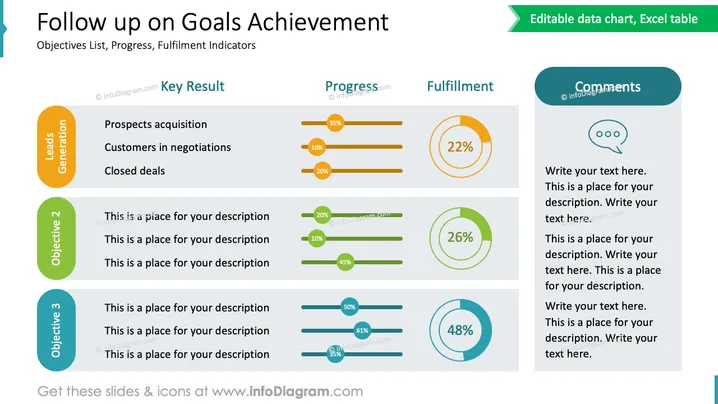
The slide "Follow up on Goals Achievement" presents a structured approach to tracking objectives and their fulfillment. It is divided into three main sections: "Key Result," "Progress," and "Fulfillment," with an additional space for "Comments." The first objective, "Leads Generation," details key results such as "Prospects acquisition," "Customers in negotiations," and "Closed deals," paired with corresponding progress percentages. Other objectives offer placeholders for descriptions and exhibit varying degrees of progress and fulfillment, visually represented by bar graphs and percentage circles.
The overall look of the slide is clean and well-organized, with a functional layout that emphasizes data presentation through the use of progress bars and circular percentage indicators. The color-coding assists in distinguishing between different objectives, making it easy to follow and interpret the information.



