
Reviews
Ihre Grafiken verleihen meinen Präsentationen eine nette Note, und ich habe sie kürzlich für eines meiner All-Hands-Meetings verwendet. Ihre Toolbox verleiht meinen Folien Professionalität, anstatt Standard-Clipart zu verwenden.
Ich brauchte einen neuen Blick auf einige meiner Folien. Ich habe versucht, einen Weg zu finden, einen Pinselschlag-Effekt zu erzielen, um zu unterstreichen, hervorzuheben, Farbe hinzuzufügen, und die handgeschriebenen Markierungen waren genau das Richtige. Sehr einfach zu bedienen, leicht in der Größe zu ändern, die Farbe zu ändern. Es war eine erschwingliche, perfekte Lösung und ich empfehle sie gerne weiter.
Die klare, saubere Optik der Grafiken und die Tatsache, dass ich die Farben leicht bearbeiten und an die Vorlage anpassen konnte, war mein Hauptgrund für den Kauf.
Description
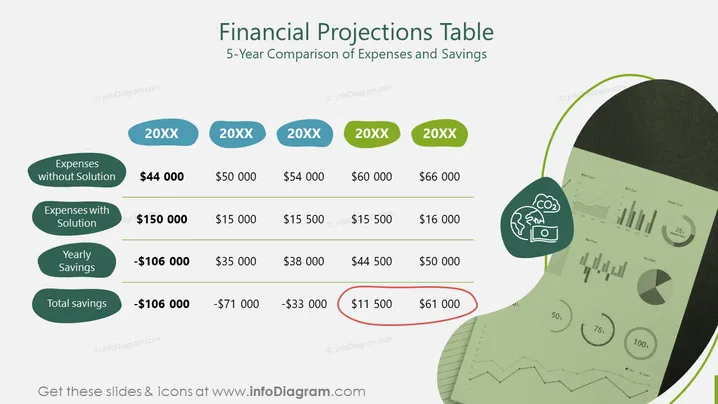
Financial Projections Table
Slide Content
This slide presents a 5-year comparison of expenses and savings in a financial projections table format. It indicates the yearly costs incurred without a particular solution versus the expenses with the solution, showing both the annual savings and total savings over five years. For instance, in the first year, expenses without the solution are $44,000, but with the solution, they rise to $150,000, resulting in a yearly saving of -$106,000 which signifies a loss due to higher initial costs.
Graphical Look
- Title in large, bold typeface: "Financial Projections Table"
- Subtitle below the title: "5-Year Comparison of Expenses and Savings"
- A series of connected oval shapes indicating years, labeled "20XX"
- Two columns beneath each year: one showing 'Expenses without Solution' and one with 'Expenses with Solution'
- Directly below these, 'Yearly Savings' calculated per year, with a 'Total savings' row at the bottom
- A graphical image in the top-right corner depicting a report with pie charts and bar graphs
- A visual icon next to the graphical image of a report, indicating a theme of environmental or energy savings (depicted by a leaf and the symbol for CO2)
The slide features a clean, organized layout with a light background, contrasting with the colorful graphical elements. The use of green and blue tones suggests a financial or environmental theme.
Use Cases
- Presenting annual cost analysis and savings in a budget meeting.
- Demonstrating long-term financial impact of an investment or solution to stakeholders.
- Providing a clear comparison of financial scenarios with and without a proposed strategy in a pitch deck.
- Using in a financial report to visualize data trends and predictions.
How to Edit
How to edit text & colors

How to expand / shorten diagram

How to Replace Icons in infoDiagram PPT


