
Your graphics add a nice touch to my presentations and I recently used them for one of my all-hands meetings. Your toolbox adds professionalism to my slides. Instead of using standard clipart.
Claude Jones, Director of Engineer, @Walmartlabs, USA
Your graphics add a nice touch to my presentations and I recently used them for one of my all-hands meetings. Your toolbox adds professionalism to my slides. Instead of using standard clipart.
Claude Jones, Director of Engineer, @Walmartlabs, USA
I needed a fresh look at some of my slides. I've tried to find a way to create a paintbrush effect, to underline, accentuate, add some color and the handwritten markers were just the things. Very easy to use, easy to size, change the color. It was an affordable, perfect solution and I'm happy to recommend it.
Anonymous, US
The crisp, clean look of the graphics, and the fact that it allowed me to easily edit and change the colors to match the template was my main reason for purchasing them.
Brandie Jenkins, E-learning Developer, USA
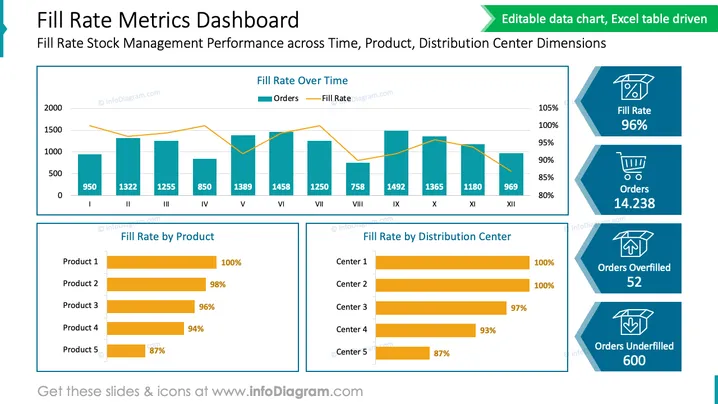
The PowerPoint slide titled "Fill Rate Metrics Dashboard" presents data related to Stock Management Performance over time, by product, and by distribution center. The slide includes a graph showing "Fill Rate Over Time" with two lines, one for orders and another representing the fill rate. Below this, there are two horizontal bar graphs: "Fill Rate by Product" shows the percentage of product availability, with Product 1 at 100% and Product 5 at the lowest with 87%. "Fill Rate by Distribution Center" displays similar information, with Center 1 and Center 2 at 100%, while Center 5 has the lowest at 87%. Additionally, there are three infographic boxes on the right showing overall fill rate (96%), number of orders (14,238), orders overfilled (52), and orders underfilled (600). Each infographic box includes an icon representing the metric: a checked box for fill rates, a shopping cart for orders, a box with items spilling over for overfilled orders, and a half-open box for underfilled orders.
The slide has a polished professional look, with a clear emphasis on data visualization through charts and infographics. The graphical elements are designed to communicate complex information in an accessible manner, making it easy to digest key performance metrics at a glance.




