
Reviews
Your graphics add a nice touch to my presentations and I recently used them for one of my all-hands meetings. Your toolbox adds professionalism to my slides. Instead of using standard clipart.
I needed a fresh look at some of my slides. I've tried to find a way to create a paintbrush effect, to underline, accentuate, add some color and the handwritten markers were just the things. Very easy to use, easy to size, change the color. It was an affordable, perfect solution and I'm happy to recommend it.
The crisp, clean look of the graphics, and the fact that it allowed me to easily edit and change the colors to match the template was my main reason for purchasing them.
Description
Explaining Unsupervised Learning ML Algorithms
Slide Content
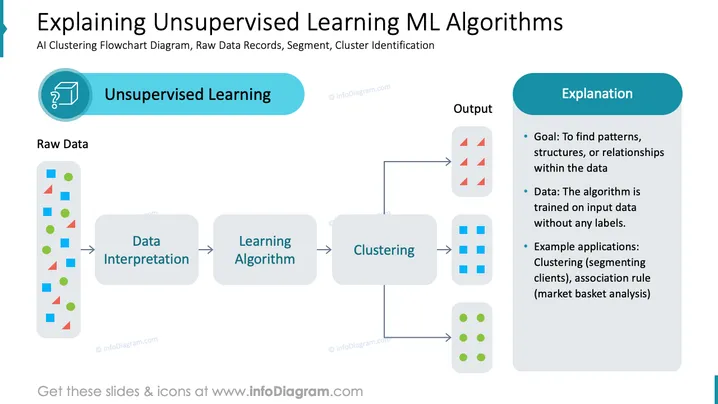
The slide is titled "Explaining Unsupervised Learning ML Algorithms" and depicts a flowchart outlining the process of unsupervised machine learning with clustering algorithms. Starting with raw data, it moves through steps of data interpretation and learning algorithms before clustering and producing output. The side panel provides an explanation, stating the goal of finding patterns or relationships within raw data, noting that the algorithm is trained without labels, and giving examples such as customer segmentation and market basket analysis.
Graphical Look
- A large title in dark text spans the top of the slide.
- A circular icon showing a magnifying glass over a chart symbolizes unsupervised learning beside a title box with the same label.
- Colored geometric shapes stacked in a vertical rectangle represent "Raw Data".
- Rounded rectangles, labeled "Data Interpretation," "Learning Algorithm," and "Clustering," depict the flowchart steps.
- Arrows connect the rounded rectangles indicating the workflow direction.
- Aligned to the right, a rectangular box contains bullet points under the header "Explanation".
- Colored clusters (triangles, squares, and circles) illustrate the output from the clustering process.
- The background is white with shades of blue used for shapes and text highlights.
The slide has a balanced and clean design with a clear flow of information from left to right following the flowchart format. The use of simple icons and shapes coupled with contrasting colors aids in letting the concepts stand out.
Use Cases
- Introducing the concept of unsupervised learning and clustering in machine learning and data science education.
- Outlining the workflow of machine learning projects to non-technical stakeholders.
- Illustrating the unsupervised learning portion of a technical presentation or research paper.
- Demonstrating the data processing pipeline during the proposal of a data analysis or ML initiative to clients or colleagues.
How to Edit
How to edit text & colors

How to expand / shorten diagram

How to Replace Icons in infoDiagram PPT


