
Reviews
Ihre Grafiken verleihen meinen Präsentationen eine nette Note, und ich habe sie kürzlich für eines meiner All-Hands-Meetings verwendet. Ihre Toolbox verleiht meinen Folien Professionalität, anstatt Standard-Clipart zu verwenden.
Ich brauchte einen neuen Blick auf einige meiner Folien. Ich habe versucht, einen Weg zu finden, einen Pinselschlag-Effekt zu erzielen, um zu unterstreichen, hervorzuheben, Farbe hinzuzufügen, und die handgeschriebenen Markierungen waren genau das Richtige. Sehr einfach zu bedienen, leicht in der Größe zu ändern, die Farbe zu ändern. Es war eine erschwingliche, perfekte Lösung und ich empfehle sie gerne weiter.
Die klare, saubere Optik der Grafiken und die Tatsache, dass ich die Farben leicht bearbeiten und an die Vorlage anpassen konnte, war mein Hauptgrund für den Kauf.
Description
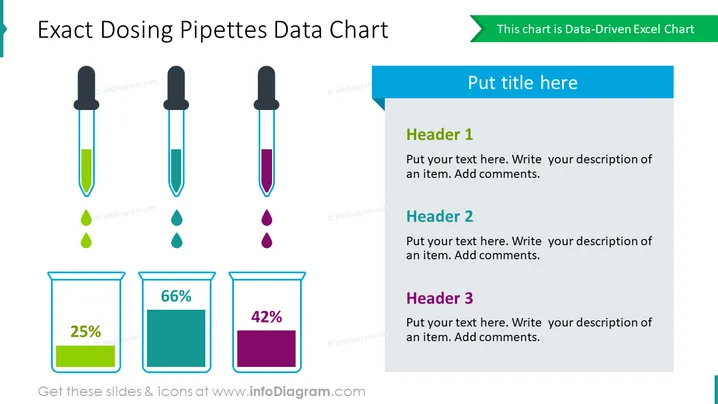
Exact Dosing Pipettes Data Chart
Slide Content
The slide presents a visual comparison of three distinct measurements displayed by pipettes and corresponding beakers denoting percentages. Each set includes a pipette with a colored liquid level and a droplet, and a beaker illustrates the percentage of that specific measurement. The indicators are color-coordinated, with the green pipette showing a 25% level, teal indicating 66%, and purple representing 42%. The slide provides placeholders for text headers and descriptions to explain each data point represented by the graphics.
Graphical Look
- Three pipettes with black tops, aligned horizontally, each filled to different levels with colors green, teal, and purple, representing various data points.
- Three matching color-coordinated droplets beneath each pipette, aligning with the colored liquid inside them.
- Three beakers below the pipettes, corresponding to the color of the pipette above them, with fill levels at 25%, 66%, and 42%, and percentage labels inside each beaker.
- On the right side of the slide, there is a text box with a blue header for a title and three sub-sections, each with its own header - 'Header 1', 'Header 2', 'Header 3' - and a placeholder text that suggests a description to be added for each item.
- At the top right corner, there is a smaller text box with a green header stating that the chart is a "Data-Driven Excel Chart".
The slide uses a clean and organized design with a light background. The color coordination between the pipettes, droplets, and beakers helps to clearly indicate related data points.
Use Cases
- Presenting quantitative data comparisons in scientific presentations, such as chemical concentrations or lab results.
- Illustrating key metrics in a business context, like market share percentages or project completion stages.
- Displaying survey data in an engaging format during marketing analyses.
- Visual representation of statistical information in educational settings for subjects such as biology or pharmacology.
How to Edit
How to edit text & colors

How to expand / shorten diagram

How to Replace Icons in infoDiagram PPT


