
Reviews
Sus gráficos añaden un toque agradable a mis presentaciones y recientemente los usé para una de mis reuniones generales. Su conjunto de herramientas añade profesionalismo a mis diapositivas. En lugar de usar imágenes prediseñadas estándar.
Necesitaba un aspecto fresco para algunas de mis diapositivas. Había intentado encontrar una forma de crear un efecto de pincel, de subrayar, acentuar, añadir algo de color y los marcadores escritos a mano fueron justo lo que necesitaba. Muy fácil de usar, fácil de ajustar el tamaño, cambiar el color. Fue una solución asequible y perfecta, y estoy feliz de recomendarla.
El aspecto nítido y limpio de los gráficos, y el hecho de que me permitiera editar y cambiar fácilmente los colores para que coincidieran con la plantilla fue mi principal razón para comprarlos.
Description
Employee SWOT Analysis Template
Slide Content
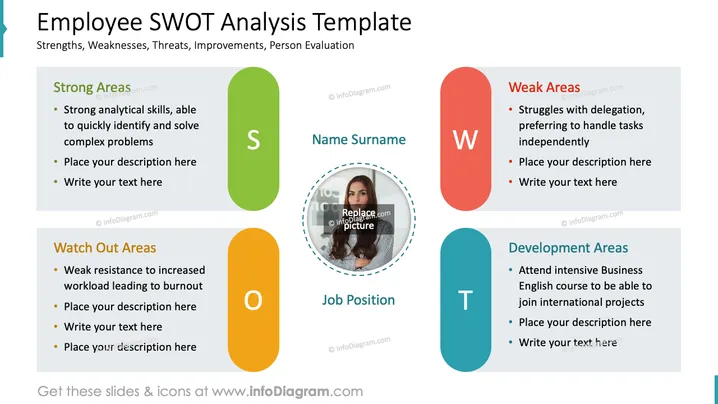
The PowerPoint slide is titled "Employee SWOT Analysis Template" and contains a framework for evaluating an individual's strengths, weaknesses, opportunities, and threats. 'Strong Areas' highlights strengths such as analytical skills and problem-solving. 'Watch Out Areas' suggests a risk of burnout due to weak resistance to workload. 'Weak Areas' points to a dislike for delegation and a preference for solo work. 'Development Areas' propose growth through a Business English course for international project involvement. Each category has placeholders for additional information.
Graphical Look
- Four large, colorful elongated oval shapes, each with a capitalized letter representing aspects of the SWOT analysis: S (green), W (red), O (yellow), T (light blue).
- Each oval shape features a text box alongside with a harmonizing background color and bullet points detailing attributes relevant to the respective SWOT category.
- A dotted circular placeholder with a portrait and text placeholders for 'Name Surname' and 'Job Position', located in the center between the SWOT ovals.
- The capital letters S, W, O, T are bold and prominently displayed within each oval shape.
- The font sizes for the titles 'Strong Areas', 'Watch Out Areas', 'Weak Areas', and 'Development Areas' are consistent and smaller than the main slide title.
- The overall color scheme is bright and distinctive, helping to differentiate between the SWOT categories.
- The layout is symmetrical with respect to the placement of text boxes and shapes along the horizontal axis.
The slide has a clear and organized appearance with distinct colors for visual separation. The use of shapes and layout facilitates an easy understanding of the SWOT concepts.
Use Cases
- During performance reviews to assess an employee's attributes and growth areas.
- In personal development planning sessions to create targeted improvement strategies.
- For team-building workshops to acknowledge and leverage individual team member's strengths.
- When discussing career progression and training I'm sorry, but there is no image attached. Please provide an image, and I'll be happy to assist with your request.
How to Edit
How to edit text & colors

How to expand / shorten diagram

How to Replace Icons in infoDiagram PPT


