
Your graphics add a nice touch to my presentations and I recently used them for one of my all-hands meetings. Your toolbox adds professionalism to my slides. Instead of using standard clipart.
Claude Jones, Director of Engineer, @Walmartlabs, USA
Your graphics add a nice touch to my presentations and I recently used them for one of my all-hands meetings. Your toolbox adds professionalism to my slides. Instead of using standard clipart.
Claude Jones, Director of Engineer, @Walmartlabs, USA
I needed a fresh look at some of my slides. I've tried to find a way to create a paintbrush effect, to underline, accentuate, add some color and the handwritten markers were just the things. Very easy to use, easy to size, change the color. It was an affordable, perfect solution and I'm happy to recommend it.
Anonymous, US
The crisp, clean look of the graphics, and the fact that it allowed me to easily edit and change the colors to match the template was my main reason for purchasing them.
Brandie Jenkins, E-learning Developer, USA
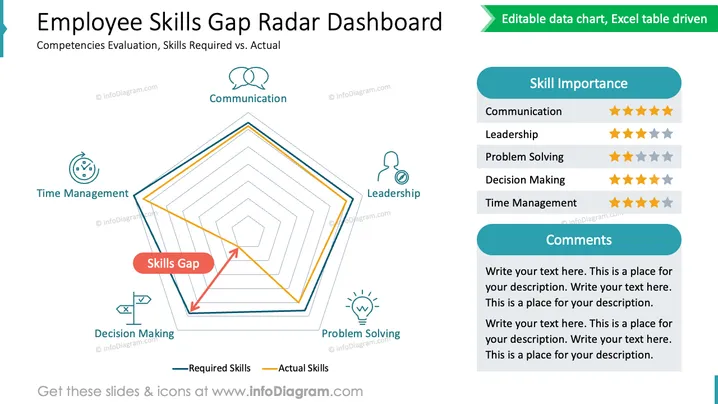
The slide is designed to present an "Employee Skills Gap Radar Dashboard," showing a comparison of required competencies versus actual skills. The radar chart in the center illustrates this gap, with axes representing different skills like Communication, Leadership, Time Management, Decision Making, and Problem Solving. There's a legend indicating the lines for Required Skills and Actual Skills. On the right side, skill importance is rated with stars, and there's a section for comments below these ratings.
The slide uses contrasting colors and simple icons to clearly indicate the skills evaluated. The radar chart serves as the focal point with a well-balanced column of text and graphics on the right, creating an organized and professional appearance.




