
Reviews
Ihre Grafiken verleihen meinen Präsentationen eine nette Note, und ich habe sie kürzlich für eines meiner All-Hands-Meetings verwendet. Ihre Toolbox verleiht meinen Folien Professionalität, anstatt Standard-Clipart zu verwenden.
Ich brauchte einen neuen Blick auf einige meiner Folien. Ich habe versucht, einen Weg zu finden, einen Pinselschlag-Effekt zu erzielen, um zu unterstreichen, hervorzuheben, Farbe hinzuzufügen, und die handgeschriebenen Markierungen waren genau das Richtige. Sehr einfach zu bedienen, leicht in der Größe zu ändern, die Farbe zu ändern. Es war eine erschwingliche, perfekte Lösung und ich empfehle sie gerne weiter.
Die klare, saubere Optik der Grafiken und die Tatsache, dass ich die Farben leicht bearbeiten und an die Vorlage anpassen konnte, war mein Hauptgrund für den Kauf.
Description
Employee Career Path
Slide Content
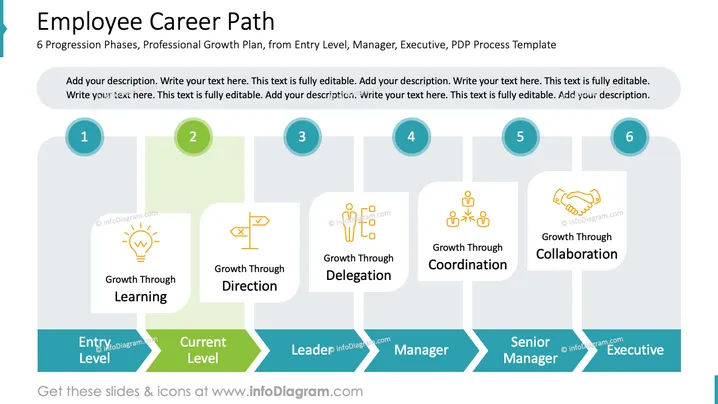
The slide titled "Employee Career Path" outlines a 6-step progression for professional growth from the Entry Level to the Executive level. Each step on the career path is represented by a segment featuring a unique color and accompanied by a circular icon representing the stage number. The first step is "Growth Through Learning," indicating foundational skills acquisition. The second, "Growth Through Direction," suggests developing strategic thinking. Following is "Growth Through Delegation," which pertains to managing tasks among team members. The fourth stage, "Growth Through Coordination," refers to synchronizing team efforts effectively. The fifth implies "Growth Through Collaboration," focusing on partnerships and joint ventures. The last stage hints at reaching the pinnacle of one's career in an executive role.
Graphical Look
- The slide has a white background with a title in dark grey, prominently displayed at the top.
- Six rectangular segments with rounded corners are connected in succession, each segment having a soft-colored background over which textual descriptions and icons are placed.
- The rounded segments are shaded alternately with light blues, greens, and greys to differentiate between stages.
- Circular icons numbered from 1 to 6 represent each step of the progression and are colored in a muted teal.
- Each segment contains smaller white rectangles that are slightly transparent, housing colorful line icons and the names of each growth phase.
- At the bottom, pointed chevrons with bold text indicate the professional level associated with each phase, increasing in seniority from left to right.
The design is professional and clean, utilizing a flowing zigzag pattern to depict the progression through a career path. The use of icons and color gradients elegantly emphasizes each stage of professional development.
Use Cases
- To present a professional development plan within a company to employees and stakeholders.
- As part of a human resources training or onboarding presentation to outline potential career trajectories.
- In management training courses to exemplify paths to leadership There seems to be an issue as I am not able to view the image you are referring to. Could you please provide it again?
How to Edit
How to edit text & colors

How to expand / shorten diagram

How to Replace Icons in infoDiagram PPT


