
Reviews
Tus diapositivas son mi 'salsa secreta' cuando se trata de visualizar mis ideas para los clientes. Estoy ahorrando tanto tiempo.
Tus diapositivas suelen generar buenos comentarios e ideas por parte de mi equipo, lo que mejora el resultado final.
Description
All table graphics – easy to adapt as regular PPT shapes
Slide Content
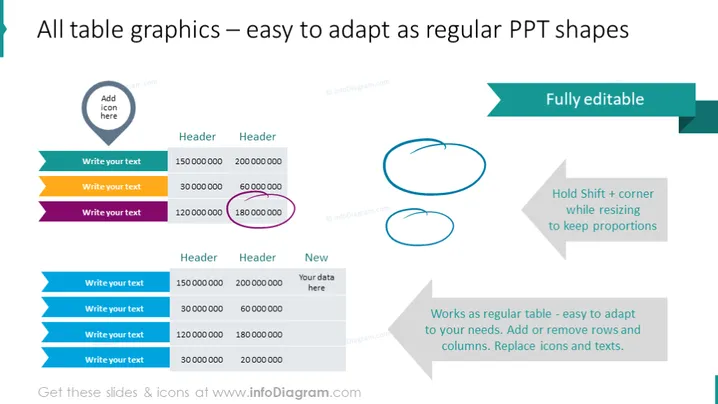
The slide is instructional and focuses on demonstrating the adaptability of table graphics within PowerPoint, indicating that they can be manipulated just like regular PPT shapes. It includes a tip on how to maintain aspect ratio by holding "Shift" while resizing shapes, emphasizes the ease of editing, and suggests the possibility of adding or removing rows and columns as well as replacing icons and text.
Graphical Look
- A large title at the top in dark teal text against a white background.
- A smaller subheading, "Fully editable," in a teal ribbon banner positioned in the upper right.
- Two sets of tables, one above the other, each with icons in the first column, editable text fields in the rest, and varying cell highlights.
- "Add icon here" placeholder within a teardrop-shaped icon on the top-left.
- Annotation in purple circling one table cell, emphasizing its editability.
- Directions on resizing shapes, with two hand-drawn blue circles as visual aids to the right.
- A footnote at the bottom in light grey explains the functionality of the table as a regular PowerPoint element.
The overall look of the slide is clean and professional with a color scheme emphasizing teals and greys. It uses contrast to highlight editable areas and practical instructions, maintaining a balance between text and visual elements.
Use Cases
- Demonstrating versatility of PowerPoint tables in a workshop or training session on presentation design.
- Showcasing the ease of adapting presentation templates to suit different datasets during a sales pitch.
- Providing a visual guide for team members to follow when updating progress reports in a consistent format.
- Enhancing client proposals by instructing how to customize data representation in slides.
How to Edit
How to edit text & colors

How to expand / shorten diagram

How to Replace Icons in infoDiagram PPT


