
Reviews
Ihre Grafiken verleihen meinen Präsentationen eine nette Note, und ich habe sie kürzlich für eines meiner All-Hands-Meetings verwendet. Ihre Toolbox verleiht meinen Folien Professionalität, anstatt Standard-Clipart zu verwenden.
Ich brauchte einen neuen Blick auf einige meiner Folien. Ich habe versucht, einen Weg zu finden, einen Pinselschlag-Effekt zu erzielen, um zu unterstreichen, hervorzuheben, Farbe hinzuzufügen, und die handgeschriebenen Markierungen waren genau das Richtige. Sehr einfach zu bedienen, leicht in der Größe zu ändern, die Farbe zu ändern. Es war eine erschwingliche, perfekte Lösung und ich empfehle sie gerne weiter.
Die klare, saubere Optik der Grafiken und die Tatsache, dass ich die Farben leicht bearbeiten und an die Vorlage anpassen konnte, war mein Hauptgrund für den Kauf.
Description
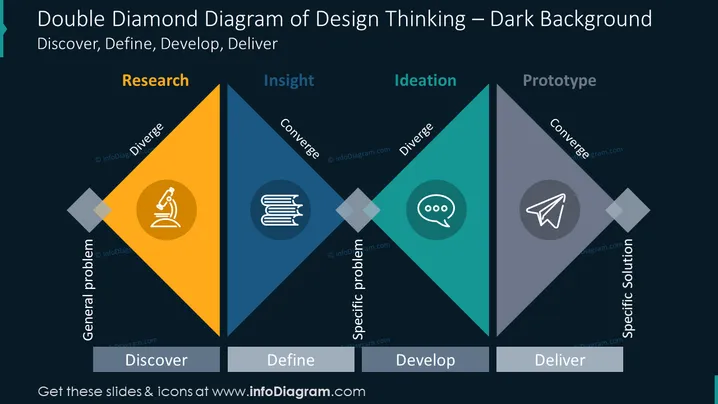
Double Diamond Diagram of Design Thinking – Dark Background
Slide Content
The slide depicts the Double Diamond Diagram used in Design Thinking processes. It comprises four phases: Discover, Define, Develop, and Deliver, each represented by a diamond shape, emphasizing the diverging and converging approaches of design. The Discover phase involves Research and diverging to understand the general problem, indicated by an icon of a microscope. The Define phase involves Insight and converges to clarify the specific problem, represented by a stack of books icon. The Develop phase moves to Ideation and diverging to brainstorm solutions, marked by a speech bubble icon. The Deliver phase is about Prototyping and converging to create a specific solution, shown with a paper plane icon.
Graphical Look
- The slide background is a dark shade, which emphasizes the content.
- Four diamond shapes are prominently displayed in a horizontal sequence, each representing a phase of the Design Thinking process.
- Each diamond shape has a different color: yellow for Discover, dark blue for Define, turquoise for Develop, and gray for Deliver, using a gradient effect.
- Inside each diamond, there is an icon and a label corresponding to a stage of the process: a microscope for Research, books for Insight, a speech bubble for Ideation, and a paper plane for Prototype.
- The labels "Diverge" and "Converge" appear in white text, indicating the nature of the thought process for each stage.
- The diagram is outlined with white borders, enhancing the visibility and division between stages.
- The four phases of the process are labeled below the diamonds with additional rectangular shapes and white text.
The overall look of this slide is professional and visually engaging. The use of contrasting colors and icons makes it easy to distinguish between different stages of the process.
Use Cases
- To explain the Design Thinking methodology during a workshop or educational session.
- In a business meeting to illustrate the process of problem solving and innovation.
- As part of a presentation to stakeholders to showcase the framework used for product or service design.
- To guide discussions about project progress and phase transitions in design and development teams.
How to Edit
How to edit text & colors

How to expand / shorten diagram

How to Replace Icons in infoDiagram PPT


