
Reviews
Your slides are my 'secret sauce' when it comes to visualising my ideas to clients. I'm saving so much time.
InfoDiagram has been a wonderful resource since I found the product site a few years ago.
Your slides often generate good comments and ideas from my team that improve the final slides.
Description
Slide Content
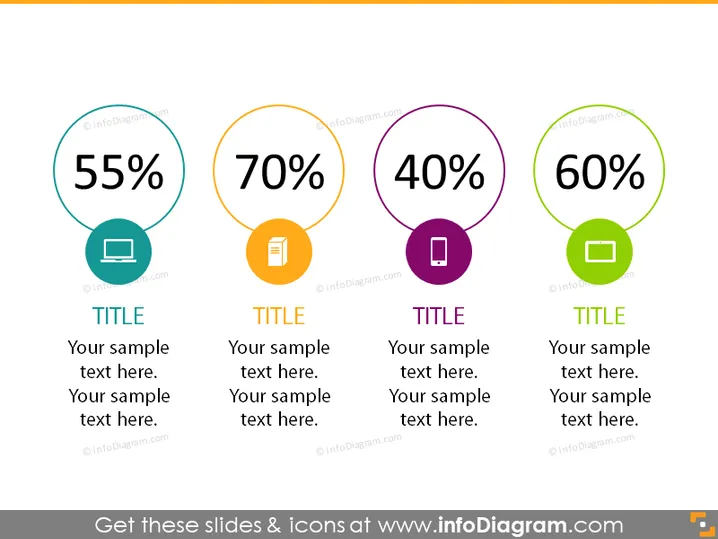
The PowerPoint slide displays four different circular graphical elements, each representing a unique percentage value and associated with a specific icon and color. The percentages shown are 55%, 70%, 40%, and 60%, each in a distinct circle. These are likely indicative of metrics such as performance, completion, satisfaction, or other measurable data. Below each circle is a placeholder for a title and additional sample text, suggesting that each metric can be further explained or contextualized.
Graphical Look
- Four large circles, each containing a percentage number and an icon, are the focal points of the slide and are aligned horizontally across the slide.
- Each circle has a unique outline color corresponding to the icon within it: teal, orange, purple, and green.
- The icons in the circles include a laptop, a document, a stop sign, and a folder, each matching the outline color of the circle.
- Beneath each circle, there is space for a title, followed by multiple lines for additional text or description.
- The background of the slide is a flat white color, which contrasts with the colorful circles and icons to draw attention to the data points. The slide has a clean, modern feel with a flat design aesthetic. The use of bright, contrasting colors makes each data point stand out, and the icons suggest different areas or topics each percentage might represent.
Use Cases
- Presenting key performance indicators (KPIs) for different aspects of a business during an internal company meeting.
- Demonstrating completion rates of various project stages within a project management presentation.
- Sharing customer satisfaction scores or employee engagement levels during quarterly business reviews to stakeholders.
- Showcasing data or survey results in a concise manner during educational or training sessions.
How to Edit
How to edit text & colors

How to expand / shorten diagram

How to Replace Icons in infoDiagram PPT


