
Reviews
Ihre Grafiken verleihen meinen Präsentationen eine nette Note, und ich habe sie kürzlich für eines meiner All-Hands-Meetings verwendet. Ihre Toolbox verleiht meinen Folien Professionalität, anstatt Standard-Clipart zu verwenden.
Ich brauchte einen neuen Blick auf einige meiner Folien. Ich habe versucht, einen Weg zu finden, einen Pinselschlag-Effekt zu erzielen, um zu unterstreichen, hervorzuheben, Farbe hinzuzufügen, und die handgeschriebenen Markierungen waren genau das Richtige. Sehr einfach zu bedienen, leicht in der Größe zu ändern, die Farbe zu ändern. Es war eine erschwingliche, perfekte Lösung und ich empfehle sie gerne weiter.
Die klare, saubere Optik der Grafiken und die Tatsache, dass ich die Farben leicht bearbeiten und an die Vorlage anpassen konnte, war mein Hauptgrund für den Kauf.
Description
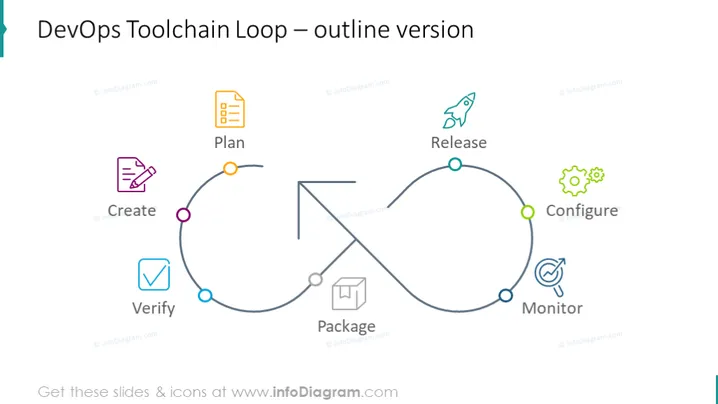
DevOps Toolchain Loop – outline version
Slide Content
The slide presents the "DevOps Toolchain Loop" in an outline version. It depicts a circular workflow with six phases: Plan, Create, Verify, Package, Release, Configure, and Monitor. "Plan" involves the strategizing and conceptualizing of the product. "Create" refers to the developing of software. "Verify" means testing the software to ensure it meets the required standards. "Package" includes assembling the software for release. "Release" represents deployment to production. "Configure" involves setting up the software in its respective environment. "Monitor" is watching the software in operation to catch and resolve issues.
Graphical Look
- The slide has a light background with a large, circular, looping arrow indicating a process flow.
- Each phase of the DevOps cycle is denoted by an icon representing the activity, with a word label below it.
- The icons are simplistic and symbolic: a document for "Plan," a pencil for "Create," a checklist for "Verify," a box for "Package," a rocket for "Release," a gear for "Configure," and an eye with an orbit for "Monitor."
- Each phase is connected by a line with a circular node, which is color-coded.
- Arrows on the line suggest the direction of the process flow from one phase to the next.
- The slide's title is at the top in a larger font than the process descriptors.
The overall design of the slide is clean and modern, with a minimal use of color to keep the focus on the process. The circular loop suggests a continuous, iterative cycle, aligning with the concept of ongoing DevOps practices.
Use Cases
- To explain the DevOps methodology and its phases during a team training or educational session.
- As a visual aid in a sales presentation to showcase a company's DevOps process to potential clients.
- In a strategic planning meeting to align team members on the current software development and deployment practices.
- For process improvement discussions, where analyzing and optimizing each phase for better efficiency is the goal.
How to Edit
How to edit text & colors

How to expand / shorten diagram

How to Replace Icons in infoDiagram PPT


