

Your graphics add a nice touch to my presentations and I recently used them for one of my all-hands meetings. Your toolbox adds professionalism to my slides. Instead of using standard clipart.
Claude Jones, Director of Engineer, @Walmartlabs, USA

Your graphics add a nice touch to my presentations and I recently used them for one of my all-hands meetings. Your toolbox adds professionalism to my slides. Instead of using standard clipart.
Claude Jones, Director of Engineer, @Walmartlabs, USA
I needed a fresh look at some of my slides. I've tried to find a way to create a paintbrush effect, to underline, accentuate, add some color and the handwritten markers were just the things. Very easy to use, easy to size, change the color. It was an affordable, perfect solution and I'm happy to recommend it.
Anonymous, US
The crisp, clean look of the graphics, and the fact that it allowed me to easily edit and change the colors to match the template was my main reason for purchasing them.
Brandie Jenkins, E-learning Developer, USA
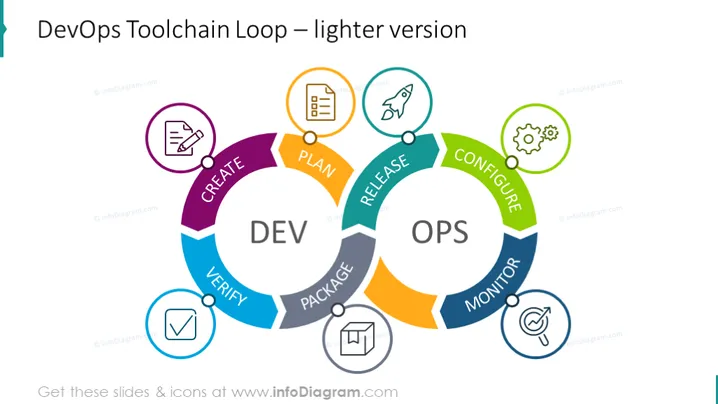
The PowerPoint slide presents an illustrated cycle known as the "DevOps Toolchain Loop," outlining the continuous stages of development and operations. "CREATE" involves conceptualizing and crafting new software features. "PLAN" is the stage where software blueprints and strategies are developed. "CODE" represents the actual programming. "BUILD" and "TEST" are subsequent steps in software development, focusing on constructing a working version and verifying its correctness. The "RELEASE" phase ensures the software is ready for deployment, followed by "DEPLOY." "OPERATE" involves the day-to-day running of the software, and "MONITOR" refers to tracking the software performance to inform further improvements.
The overall look of the slide is both engaging and informative, utilizing a sleek and modern design to facilitate understanding of the DevOps process. The infographic's vibrant colors and associated icons aid in visual differentiation of the stages within the cycle.



