
Reviews
Sus gráficos añaden un toque agradable a mis presentaciones y recientemente los usé para una de mis reuniones generales. Su conjunto de herramientas añade profesionalismo a mis diapositivas. En lugar de usar imágenes prediseñadas estándar.
Necesitaba un aspecto fresco para algunas de mis diapositivas. Había intentado encontrar una forma de crear un efecto de pincel, de subrayar, acentuar, añadir algo de color y los marcadores escritos a mano fueron justo lo que necesitaba. Muy fácil de usar, fácil de ajustar el tamaño, cambiar el color. Fue una solución asequible y perfecta, y estoy feliz de recomendarla.
El aspecto nítido y limpio de los gráficos, y el hecho de que me permitiera editar y cambiar fácilmente los colores para que coincidieran con la plantilla fue mi principal razón para comprarlos.
Description
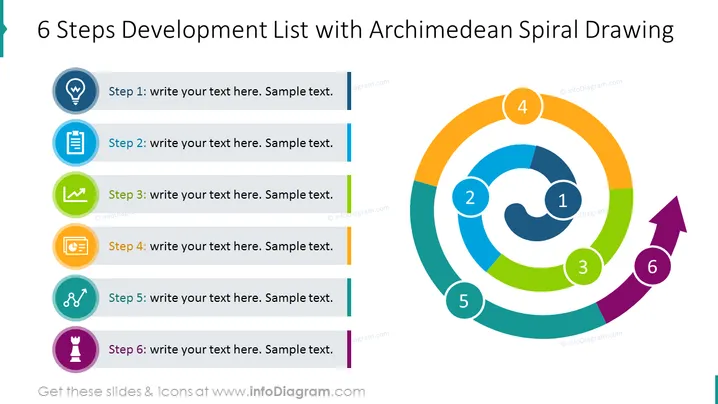
6 Steps Development List with Archimedean Spiral Drawing
Slide Content
The PowerPoint slide presents a structured process consisting of six steps. Each step is paired with a unique icon and a color, suggesting a sequential flow or development strategy. Step 1 starts with an idea symbol, indicating the inception of a concept. Step 2 follows with a clipboard icon, likely representing planning or documentation. Step 3 features a check mark, which may suggest evaluation or completion of a task. Step 4 has a speech bubble, perhaps denoting discussion or feedback. Step 5 shows a link chain, symbolizing integration or connection between elements. Step 6 concludes with a chess piece icon, possibly standing for strategy or final decision-making.
Graphical Look
- The slide background is white, providing a clean canvas for content.
- The title "6 Steps Development List with Archimedean Spiral Drawing" is in dark text at the top.
- On the left, there are six vertically stacked, rounded rectangular shapes, each with a distinct color and an icon, with text placeholders beside them.
- Each shape is associated with a number, indicating the step sequence from 1 to 6.
- To the right, there's an Archimedean spiral graphic with six colored segments corresponding to the colors and sequence of the steps on the left.
- The spiral has numbers from 1 to 6, placed inside small circles that match the segment colors.
- A purple arrow with the number 6 extends from the spiral's center, indicating forward motion or progression.
The slide has a balanced design with a clear division between text content on the left and a vibrant, color-coded spiral on the right. The use of icons and colors is visually appealing and enhances the understanding of the process flow.
Use Cases
- To present a business development or project plan in stages to a team or stakeholders.
- As a visual aid during a workshop or training session to describe a multi-step process.
- Incorporate in strategy presentations to outline the phases of implementing a new business strategy.
- Use in progress reports or meetings to show advancement through different phases of a project or initiative.
How to Edit
How to edit text & colors

How to expand / shorten diagram

How to Replace Icons in infoDiagram PPT


