
Your graphics add a nice touch to my presentations and I recently used them for one of my all-hands meetings. Your toolbox adds professionalism to my slides. Instead of using standard clipart.
Claude Jones, Director of Engineer, @Walmartlabs, USA
Your graphics add a nice touch to my presentations and I recently used them for one of my all-hands meetings. Your toolbox adds professionalism to my slides. Instead of using standard clipart.
Claude Jones, Director of Engineer, @Walmartlabs, USA
I needed a fresh look at some of my slides. I've tried to find a way to create a paintbrush effect, to underline, accentuate, add some color and the handwritten markers were just the things. Very easy to use, easy to size, change the color. It was an affordable, perfect solution and I'm happy to recommend it.
Anonymous, US
The crisp, clean look of the graphics, and the fact that it allowed me to easily edit and change the colors to match the template was my main reason for purchasing them.
Brandie Jenkins, E-learning Developer, USA
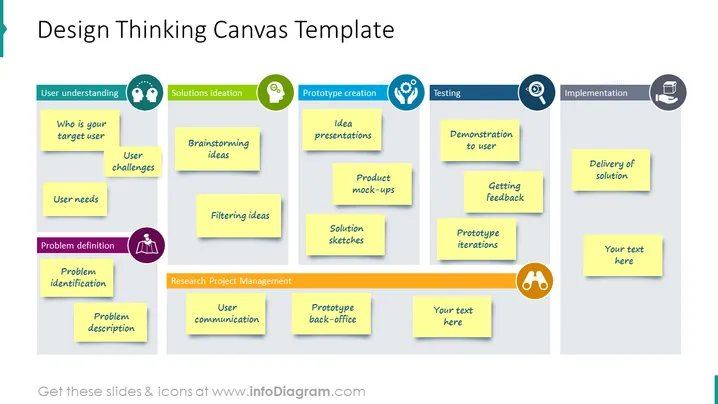
This is a design-thinking canvas template with sticky notes on a board. Understand your user – who are they, their challenges, and their needs. Define the problem, identify it, and describe it. Then go for a solution ideation like brainstorming and filtering ideas. For the prototype creation – idea presentation, product mock-ups, and solution sketches. In the testing phase demonstrate it to users, get feedback, and prototype iterations. In the implementation process – delivery of a solution. We have listed these examples to help you get inspired for presenting your text. All the graphics are editable, so you can adjust the graphics as you wish, without losing any quality. You can download the presentation in other software, such as Google Slides or Keynote. Click on the picture for more illustrative ideas.
PPT Boards, Sticky Notes, Flat Outline Style Icons, Colorful Banners




