
Reviews
Sus gráficos añaden un toque agradable a mis presentaciones y recientemente los usé para una de mis reuniones generales. Su conjunto de herramientas añade profesionalismo a mis diapositivas. En lugar de usar imágenes prediseñadas estándar.
Necesitaba un aspecto fresco para algunas de mis diapositivas. Había intentado encontrar una forma de crear un efecto de pincel, de subrayar, acentuar, añadir algo de color y los marcadores escritos a mano fueron justo lo que necesitaba. Muy fácil de usar, fácil de ajustar el tamaño, cambiar el color. Fue una solución asequible y perfecta, y estoy feliz de recomendarla.
El aspecto nítido y limpio de los gráficos, y el hecho de que me permitiera editar y cambiar fácilmente los colores para que coincidieran con la plantilla fue mi principal razón para comprarlos.
Description
Slide content:
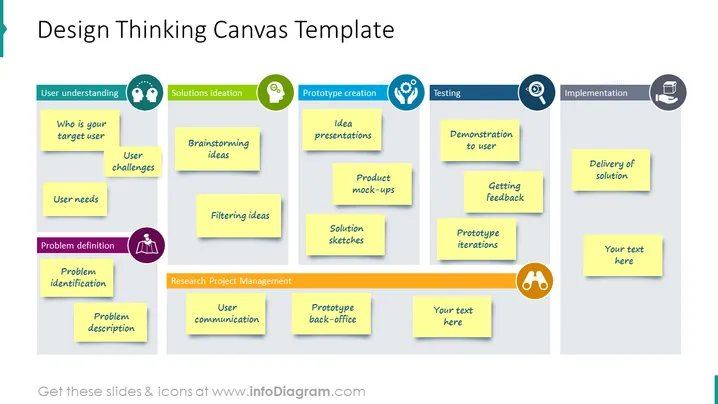
This is a design-thinking canvas template with sticky notes on a board. Understand your user – who are they, their challenges, and their needs. Define the problem, identify it, and describe it. Then go for a solution ideation like brainstorming and filtering ideas. For the prototype creation – idea presentation, product mock-ups, and solution sketches. In the testing phase demonstrate it to users, get feedback, and prototype iterations. In the implementation process – delivery of a solution. We have listed these examples to help you get inspired for presenting your text. All the graphics are editable, so you can adjust the graphics as you wish, without losing any quality. You can download the presentation in other software, such as Google Slides or Keynote. Click on the picture for more illustrative ideas.
Slide infographic description:
PPT Boards, Sticky Notes, Flat Outline Style Icons, Colorful Banners
How to Edit
How to edit text & colors

How to expand / shorten diagram

How to Replace Icons in infoDiagram PPT


