

Your graphics add a nice touch to my presentations and I recently used them for one of my all-hands meetings. Your toolbox adds professionalism to my slides. Instead of using standard clipart.
Claude Jones, Director of Engineer, @Walmartlabs, USA

Your graphics add a nice touch to my presentations and I recently used them for one of my all-hands meetings. Your toolbox adds professionalism to my slides. Instead of using standard clipart.
Claude Jones, Director of Engineer, @Walmartlabs, USA
I needed a fresh look at some of my slides. I've tried to find a way to create a paintbrush effect, to underline, accentuate, add some color and the handwritten markers were just the things. Very easy to use, easy to size, change the color. It was an affordable, perfect solution and I'm happy to recommend it.
Anonymous, US
The crisp, clean look of the graphics, and the fact that it allowed me to easily edit and change the colors to match the template was my main reason for purchasing them.
Brandie Jenkins, E-learning Developer, USA
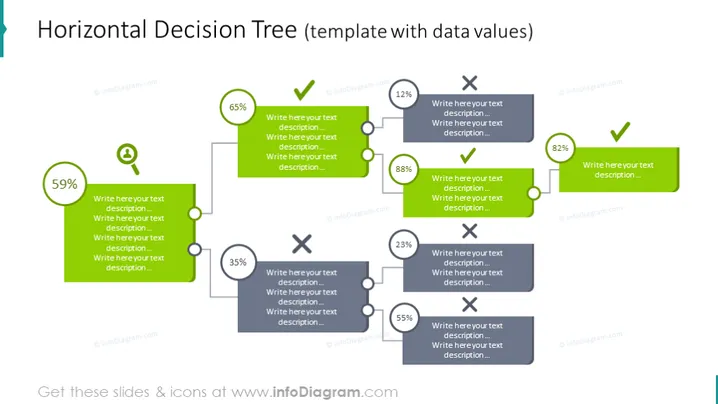
The slide represents a Horizontal Decision Tree, a visual tool often used to display a series of choices and their outcomes. The template includes percentages that likely represent statistical probabilities or data values associated with each decision path. It begins with a 59% marker, followed by two branches: one with 65% leading to a positive outcome and the other with 35% leading to a negative outcome. Further branching shows an 88% positive path alongside an opposite 12% negative outcome, as well as a 55% positive branch opposed to a negative 23% outcome. Each node offers space to write a detailed description, allowing the presenter to expand upon what each percentage or decision represents.
The slide's overall appearance is clean and modern, using a minimal color palette to draw attention to specific elements such as the decision points and outcomes. The design is symmetrical, with branches on either side of the main decision path, creating a balanced visual flow.



