
Reviews
Your graphics add a nice touch to my presentations and I recently used them for one of my all-hands meetings. Your toolbox adds professionalism to my slides. Instead of using standard clipart.
I needed a fresh look at some of my slides. I've tried to find a way to create a paintbrush effect, to underline, accentuate, add some color and the handwritten markers were just the things. Very easy to use, easy to size, change the color. It was an affordable, perfect solution and I'm happy to recommend it.
The crisp, clean look of the graphics, and the fact that it allowed me to easily edit and change the colors to match the template was my main reason for purchasing them.
Description
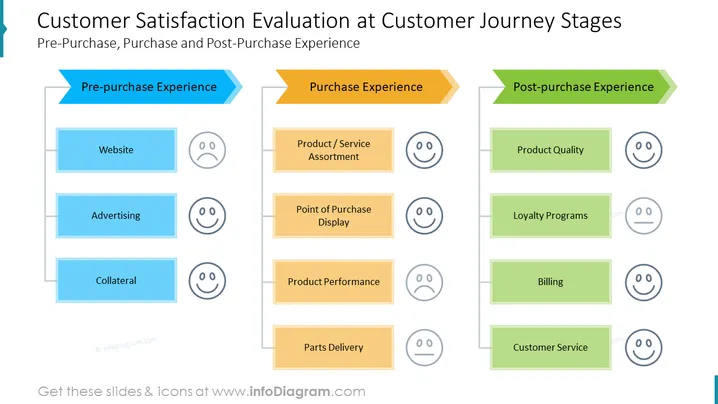
Customer Satisfaction Evaluation at Customer Journey Stages
This PowerPoint slide provides a comprehensive overview of customer satisfaction evaluation at various stages of the customer journey, encompassing pre-purchase, purchase, and post-purchase experiences. It effectively illustrates the key touchpoints and factors that influence customer satisfaction throughout their interaction with a brand or product. This infographic-style slide can be seamlessly integrated into business presentations to: highlight the importance of evaluating customer satisfaction at every stage of the customer journey; identify critical touchpoints that require attention to enhance customer satisfaction; emphasize the connection between customer satisfaction and overall business success.
What Does This Customer Satisfaction Evaluation at Customer Journey Stages Slide Include?
- A three-stage customer journey timeline: pre-purchase, purchase, and post-purchase
- Distinct sections for each stage, visually separated by color blocks
- Relevant icons representing key touchpoints within each stage
- Outline icons of a happy face, neural face, and sad face
This Customer Satisfaction Evaluation at Customer Journey Stages Slide is a part of our Customer Experience Management Strategy Processes PPT Template.
How to Edit
How to edit text & colors

How to expand / shorten diagram

How to Replace Icons in infoDiagram PPT


