
Reviews
Ihre Grafiken verleihen meinen Präsentationen eine nette Note, und ich habe sie kürzlich für eines meiner All-Hands-Meetings verwendet. Ihre Toolbox verleiht meinen Folien Professionalität, anstatt Standard-Clipart zu verwenden.
Ich brauchte einen neuen Blick auf einige meiner Folien. Ich habe versucht, einen Weg zu finden, einen Pinselschlag-Effekt zu erzielen, um zu unterstreichen, hervorzuheben, Farbe hinzuzufügen, und die handgeschriebenen Markierungen waren genau das Richtige. Sehr einfach zu bedienen, leicht in der Größe zu ändern, die Farbe zu ändern. Es war eine erschwingliche, perfekte Lösung und ich empfehle sie gerne weiter.
Die klare, saubere Optik der Grafiken und die Tatsache, dass ich die Farben leicht bearbeiten und an die Vorlage anpassen konnte, war mein Hauptgrund für den Kauf.
Description
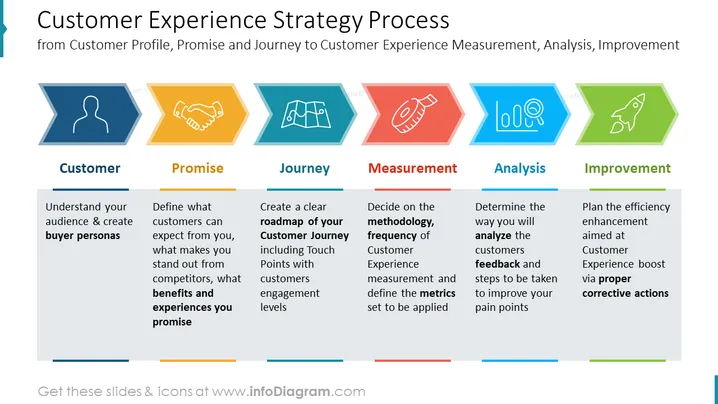
##Slide content: This PPT slide shows the customer experience strategy process through six stages. Customer profile - understand your buyer personas; customer promise - define what the customers can expect from you, what makes you stand out from the competitors, and what benefits and experiences you promise. Create a clear customer journey map, including touchpoints with customer engagement levels. Measurement - decide on the methodology, and frequency of customer experience measurement and define the metrics set to be applied. Analysis - determine the way you will analyze the customers' feedback and steps to be taken to improve your pain points. Improvement - plan the efficiency enhancement aimed at customer experience boost via proper corrective actions. You can download this presentation in other software as Google Slides and Keynote, without any quality loss. All the graphics are customizable so you can adjust them based on your needs. Click on the picture to see the whole Customer Experience Management 101 PowerPoint Template.
##Slide infographic description: Arrow Shaped Icons, Line Vector, Process Diagram, Man Icon, Handshake Icon, Tape Icon, Map Icon, Analysis Icon, Rocket Launch Icon, Color Coding
How to Edit
How to edit text & colors

How to expand / shorten diagram

How to Replace Icons in infoDiagram PPT


