
Reviews
The icons are fantastic, easy to use, and will add value to any project or presentation. Keep up the great work.
I love how simple infoDiagram's solutions are and the personal interest they took in my work. Recommended 1000%!
The crisp, clean look of the graphics, and the fact that it allowed me to easily edit and change the colors to match the template was my main reason for purchasing them.
Description
Current Processes
Slide Content:
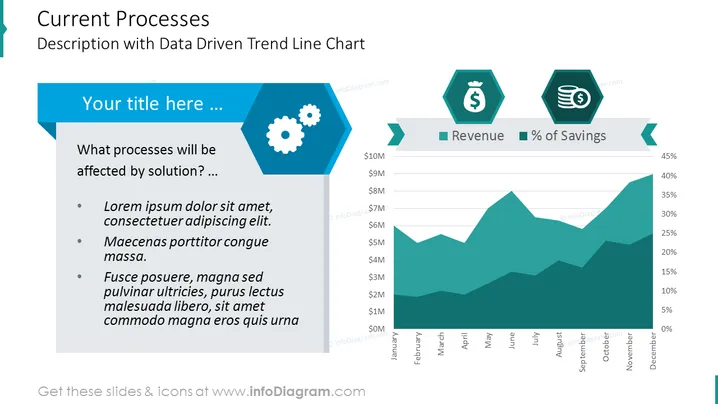
The PowerPoint slide is designed to offer a detailed analysis of current processes with a focus on trends over time, as indicated by a trend line chart. The title suggests a discussion on processes affected by a new solution, and the bullet points provide a structure for presenting problems, proposed solutions, and expected benefits. The trend line chart, with dual indicators for revenue and percentage of savings, provides a visual representation of financial performance over a yearly quarter.
Graphical Look:
- A large, bold title at the top.
- A light blue text box with a title placeholder that can be customized.
- A list with three bullet points for text content on the left side of the slide.
- Two hexagonal icons, one with a dollar sign symbolizing revenue and the other with a stack of coins symbolizing savings.
- A layered trend line chart displaying two sets of data, with months on the horizontal axis and financial figures on the vertical axis.
The overall design employs a professional color palette of blues and greens, creating a corporate feel. The hexagonal shapes add a modern geometric touch, while the chart provides a clear visual of data trends.
Use Cases:
- In financial review meetings to discuss performance metrics and cost savings.
- For strategic planning sessions to visually present the impact of operational changes.
- During shareholder or board meetings to report on company financial health.
- As part of a business analyst's presentation to highlight trends and forecast future performance.
How to Edit
How to edit text & colors

How to expand / shorten diagram

How to Replace Icons in infoDiagram PPT


