
Reviews
Your graphics add a nice touch to my presentations and I recently used them for one of my all-hands meetings. Your toolbox adds professionalism to my slides. Instead of using standard clipart.
I needed a fresh look at some of my slides. I've tried to find a way to create a paintbrush effect, to underline, accentuate, add some color and the handwritten markers were just the things. Very easy to use, easy to size, change the color. It was an affordable, perfect solution and I'm happy to recommend it.
The crisp, clean look of the graphics, and the fact that it allowed me to easily edit and change the colors to match the template was my main reason for purchasing them.
Description
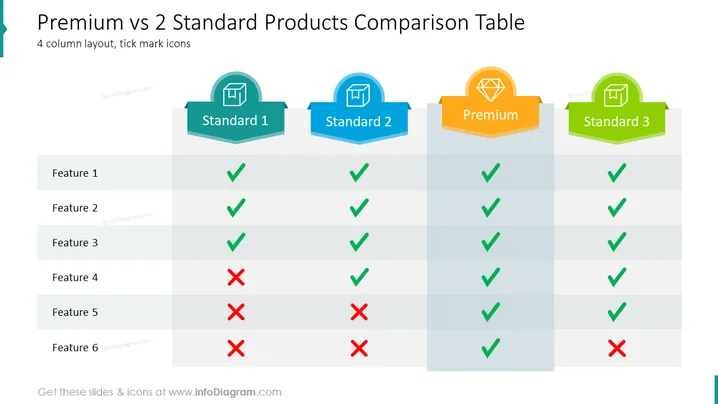
Premium vs 2 Standard Products Comparison Table
Slide Content
This slide presents a comparison table that contrasts the features of a Premium product against two Standard products. The table consists of six features, with green check marks indicating the presence of a feature and red crosses denoting its absence. Standard 1 offers four features; Standard 2 provides five, and the premium product includes all but one. This concise visual representation effectively communicates the comparative advantages and disadvantages of each product offering.
Graphical Look
- The slide has a clean, structured design utilizing a four-column layout.
- Each column header is represented by a unique color and icon within a badge-shaped graphic, creating a visually distinct label for each product category.
- Green check marks and red crosses, stylized with a slight 3D effect, visually represent the availability or absence of features across the products.
- Alternating shades of grey for each row enhance readability by differentiating between the listed features.
- There's a light blue banner on the left with a cut corner, complementing the color scheme and serving as a visual anchor.
The overall look of the slide is modern and business-like, with a clear emphasis on comparison through visual cues. The colors and shapes are used consistently to aid in quickly distinguishing between the different products and features.
Use Cases
- To present product comparisons during sales or marketing presentations to highlight the differences between various tiers or packages.
- In internal strategy meetings to discuss product development priorities by analyzing competitive product features.
- For use in client or investor pitches to showcase the added value of a premium offering compared to standard versions.
- In trade shows or product demonstrations, as a visual aid to quickly communicate the benefits and distinctions of a product lineup to potential customers.
How to Edit
How to edit text & colors

How to expand / shorten diagram

How to Replace Icons in infoDiagram PPT


