
Reviews
Ihre Grafiken verleihen meinen Präsentationen eine nette Note, und ich habe sie kürzlich für eines meiner All-Hands-Meetings verwendet. Ihre Toolbox verleiht meinen Folien Professionalität, anstatt Standard-Clipart zu verwenden.
Ich brauchte einen neuen Blick auf einige meiner Folien. Ich habe versucht, einen Weg zu finden, einen Pinselschlag-Effekt zu erzielen, um zu unterstreichen, hervorzuheben, Farbe hinzuzufügen, und die handgeschriebenen Markierungen waren genau das Richtige. Sehr einfach zu bedienen, leicht in der Größe zu ändern, die Farbe zu ändern. Es war eine erschwingliche, perfekte Lösung und ich empfehle sie gerne weiter.
Die klare, saubere Optik der Grafiken und die Tatsache, dass ich die Farben leicht bearbeiten und an die Vorlage anpassen konnte, war mein Hauptgrund für den Kauf.
Description
Cost Per Unit - CPU Metrics Analysis
Slide Content
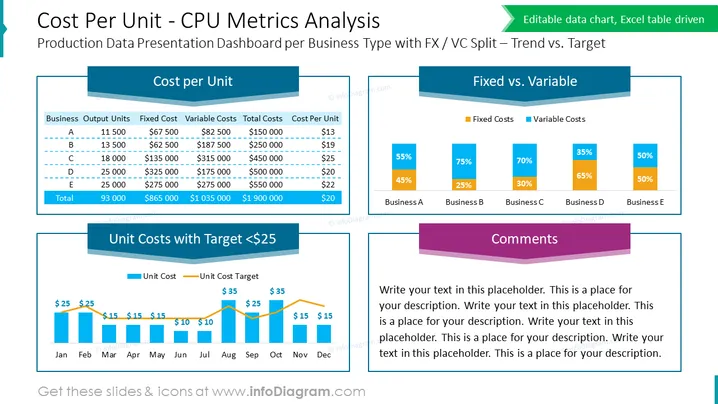
The slide titled "Cost Per Unit - CPU Metrics Analysis" focuses on a Production Data Presentation Dashboard for Business Type with FX / VC Split – Trend vs. Target. It breaks down various cost factors into three primary sections. The "Cost per Unit" section tabulates Business Output Units against Fixed, Variable, and Total Costs to calculate the Cost Per Unit. The "Fixed vs. Variable" section represents a graphical comparison of Fixed and Variable Costs across five business segments: A to E. Lastly, the "Unit Costs with Target <$25" section is a bar and line chart that tracks Unit Costs against a set Monthly Target, with a final "Comments" area for customizable text.
Graphical Look
- The slide uses a dominant blue color scheme with touches of orange for highlights.
- The title is prominently displayed at the top in large bold white text against a dark blue background.
- The "Cost per Unit" section has a table with alternating row colors for readability.
- Bar graphs in the "Fixed vs. Variable" section employ contrasting colors to differentiate between Fixed and Variable Costs.
- The "Unit Costs with Target <$25" chart uses bars and a line to visually compare actual costs against a target value prominently denoted by a colored horizontal line.
- A purple text box titled "Comments" allows for the addition of custom comments or analysis.
The slide looks professional and is designed for clear communication of complex cost analysis. The use of color-coding and graphical elements such as tables and charts facilitates easy interpretation of data.
Use Cases
- This slide is suitable for financial reporting during business meetings to communicate cost analysis and operational efficiency.
- It can be employed in management presentations for comparing actual manufacturing costs against predefined targets or budgets.
- Use this slide during strategic planning sessions to highlight areas for cost optimization.
- It is also applicable in investor briefings to showcase the company's cost management and trending financial performance.
How to Edit
How to edit text & colors

How to expand / shorten diagram

How to Replace Icons in infoDiagram PPT


