
Reviews
Your graphics add a nice touch to my presentations and I recently used them for one of my all-hands meetings. Your toolbox adds professionalism to my slides. Instead of using standard clipart.
I needed a fresh look at some of my slides. I've tried to find a way to create a paintbrush effect, to underline, accentuate, add some color and the handwritten markers were just the things. Very easy to use, easy to size, change the color. It was an affordable, perfect solution and I'm happy to recommend it.
The crisp, clean look of the graphics, and the fact that it allowed me to easily edit and change the colors to match the template was my main reason for purchasing them.
Description
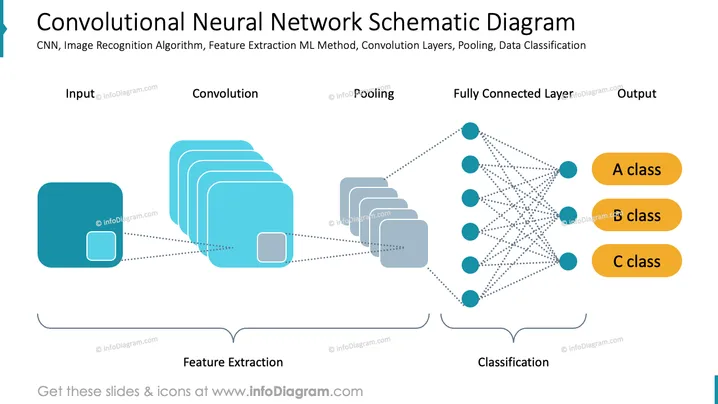
Convolutional Neural Network Schematic Diagram
Slide Content
The PowerPoint slide presents a simplified overview of how a Convolutional Neural Network (CNN) processes data from input to output. The slide breaks down the workflow into stages, starting with input, moving through convolution and pooling steps which are collectively known as feature extraction, then passing through a fully connected layer, and ending with the classification into A, B, or C class. Each step plays a crucial role in determining features, reducing complexity, and assigning categories based on learned characteristics.
Graphical Look
- A light blue ribbon banner on the top-left corner serves as a background for the slide title.
- Icons representing each stage of the CNN process, starting with a square for input, interrupted rectangles for convolution, smaller rectangles for pooling, and circles for the fully connected layer.
- The icons are interconnected with dotted lines, suggesting the flow and transformation of data through the network.
- Three oval shapes in mustard color labeled "A class," "B class," and "C class" act as the endpoints of the network, representing output classifications.
- Underneath the process flow, two curved bracket lines are labeled "Feature Extraction" and "Classification," categorizing the stages of the CNN process.
- The overall design is clean and uses shades of blue and gray, with accents of mustard for contrast.
The slide has a modern and technical feel with clear graphics representing the stages of a Convolutional Neural Network. The use of dotted lines and different shapes effectively conveys the notion of information flow through the system.
Use Cases
- Explaining the basics of CNNs to students or new employees in artificial intelligence or machine learning fields.
- Presenting the architecture of a CNN during a technical review or pitch to stakeholders.
- Illustrating how image or pattern recognition tasks are handled by machine learning algorithms in product demonstrations.
- For use in academic settings, such as lectures or seminars on deep learning and computer vision.
How to Edit
How to edit text & colors

How to expand / shorten diagram

How to Replace Icons in infoDiagram PPT


