
Reviews
Your slides are my "secret sauce" when it comes to presenting my ideas to clients. I save a lot of time.
J'avais un délai de livraison à respecter et je n'avais pas le temps de créer une variété de modèles de diapositives. Infodiagram m'a proposé des options faciles à télécharger et à personnaliser en fonction de mes besoins !
Vos diapositives suscitent souvent de précieux commentaires et idées de la part de mon équipe, ce qui améliore les diapositives finales.
Description
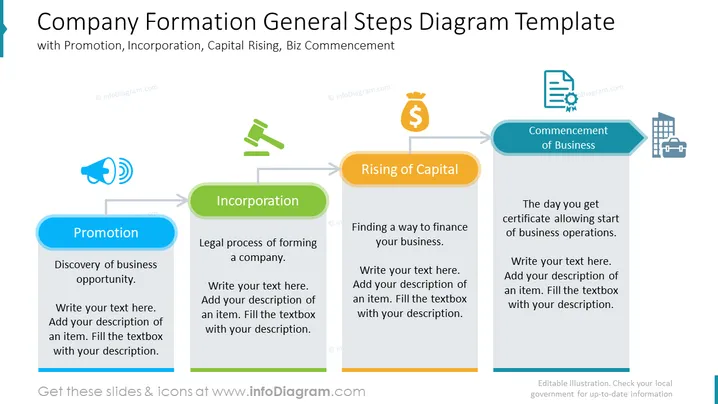
Company Formation General Steps Diagram Template
Slide Content:
The PowerPoint slide is a diagram template that explains the general steps of company formation. It consists of four steps: Promotion, Incorporation, Capital Raising, and Business Commencement. Promotion is the discovery of a business opportunity, Incorporation is the legal process of forming a company, Capital Raising is finding ways to finance your business, and Business Commencement is the day you start operating your business.
Graphical Look:
- The slide has a simple and clean design, with a white background and black text.
- The title of the slide is displayed in a large, bold font at the top of the slide.
- The diagram is in the center of the slide.
- The diagram is a flow chart with four rectangular boxes connected by arrows.
- The boxes are in different colors.
- Each box has a title and a description.
- The description is in a smaller font size than the title.
- The slide also includes a few simple icons.
Use Cases
You can use such a slide in a variety of settings, such as:
- To introduce the company formation process to a new audience.
- To explain the company formation process to potential investors or lenders.
- To provide an overview of the company formation process to new employees.
- To track the progress of the company formation process.
- To identify any potential roadblocks in the company formation process.
How to Edit
How to edit text & colors

How to expand / shorten diagram

How to Replace Icons in infoDiagram PPT


