
Reviews
Sus gráficos añaden un toque agradable a mis presentaciones y recientemente los usé para una de mis reuniones generales. Su conjunto de herramientas añade profesionalismo a mis diapositivas. En lugar de usar imágenes prediseñadas estándar.
Necesitaba un aspecto fresco para algunas de mis diapositivas. Había intentado encontrar una forma de crear un efecto de pincel, de subrayar, acentuar, añadir algo de color y los marcadores escritos a mano fueron justo lo que necesitaba. Muy fácil de usar, fácil de ajustar el tamaño, cambiar el color. Fue una solución asequible y perfecta, y estoy feliz de recomendarla.
El aspecto nítido y limpio de los gráficos, y el hecho de que me permitiera editar y cambiar fácilmente los colores para que coincidieran con la plantilla fue mi principal razón para comprarlos.
Description
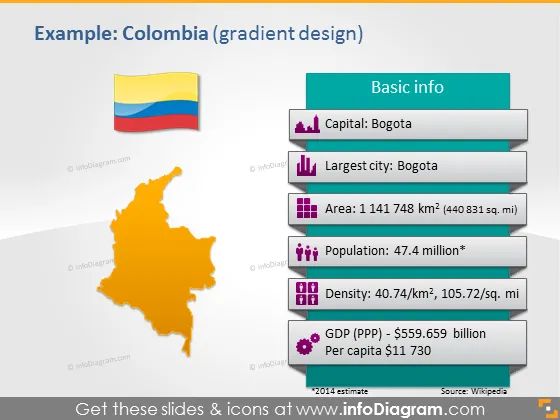
Example: Colombia (gradient design)
Slide Content
The PowerPoint slide presents an overview of Colombia with a gradient design, featuring basic information about the country. The slide lists the capital as Bogota and identifies it as the country's largest city as well. The area is given as 1,141,748 km², offering a sense of its size, and the population is listed as 47.4 million, indicating the number of inhabitants. The density is noted to be 40.74/km², giving an idea of how populated the regions are. The GDP (PPP) is stated to be $559.659 billion, with a per capita income of $11,730, giving a snapshot of the economic status.
Graphical Look
- A colored top bar with the title "Example: Colombia (gradient design)" in white font.
- The Colombian flag is depicted as a small, stylized ribbon graphic in the upper left corner.
- An orange-shaded map of Colombia is centered to the left of the slide.
- To the right, a vertically aligned, light blue text box labeled "Basic info" with a darker blue header contains key information points.
- Each information point is accompanied by a uniquely colored icon: a purple location marker, a blue building, yellow stacked squares, red individuals, green networking nodes, and purple currency notes.
- The source reference "Source: Wikipedia" at the bottom shows the data's origin.
The slide is colorful with a professional design, utilizing a combination of icons, bold colors, and a clear font to represent the informative content cohesively. The use of gradient color in the background provides a modern aesthetic.
Use Cases
- Incorporating into a presentation about Colombia for educational purposes in schools or universities.
- Utilizing in a business context for briefing on market analysis or expansion plans involving Colombia.
- Employing in a travel industry presentation to showcase Colombia as a tourism destination.
- Presenting at an international conference to provide participants with quick facts about Colombia.
How to Edit
How to edit text & colors

How to expand / shorten diagram

How to Replace Icons in infoDiagram PPT


