

Your graphics add a nice touch to my presentations and I recently used them for one of my all-hands meetings. Your toolbox adds professionalism to my slides. Instead of using standard clipart.
Claude Jones, Director of Engineer, @Walmartlabs, USA

Your graphics add a nice touch to my presentations and I recently used them for one of my all-hands meetings. Your toolbox adds professionalism to my slides. Instead of using standard clipart.
Claude Jones, Director of Engineer, @Walmartlabs, USA
I needed a fresh look at some of my slides. I've tried to find a way to create a paintbrush effect, to underline, accentuate, add some color and the handwritten markers were just the things. Very easy to use, easy to size, change the color. It was an affordable, perfect solution and I'm happy to recommend it.
Anonymous, US
The crisp, clean look of the graphics, and the fact that it allowed me to easily edit and change the colors to match the template was my main reason for purchasing them.
Brandie Jenkins, E-learning Developer, USA
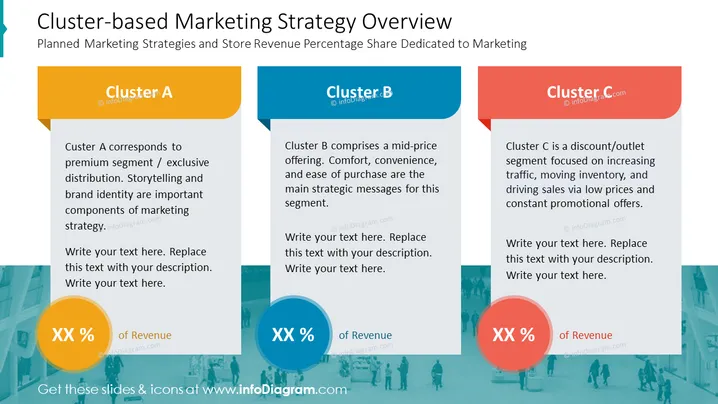
The slide titled "Cluster-based Marketing Strategy Overview" addresses marketing strategies for three distinct customer segments, with each cluster correlating to a particular market approach and revenue share dedicated to marketing. Cluster A corresponds to the premium segment with a focus on storytelling and exclusive distribution. It highlights the importance of brand identity in its marketing strategy. Cluster B is aimed at a mid-price range, emphasizing comfort, convenience, and the ease of purchase as its strategic pillars. Cluster C represents a discount or outlet segment, aiming at driving sales with low prices and constant promotional deals, thus focusing on inventory movement and traffic increase.
The overall look of the slide is professional and clean, with a color-coded system that visually distinguishes each market segment's strategy. The use of icons and tabs makes the information easy to follow.



