

Your graphics add a nice touch to my presentations and I recently used them for one of my all-hands meetings. Your toolbox adds professionalism to my slides. Instead of using standard clipart.
Claude Jones, Director of Engineer, @Walmartlabs, USA

Your graphics add a nice touch to my presentations and I recently used them for one of my all-hands meetings. Your toolbox adds professionalism to my slides. Instead of using standard clipart.
Claude Jones, Director of Engineer, @Walmartlabs, USA
I needed a fresh look at some of my slides. I've tried to find a way to create a paintbrush effect, to underline, accentuate, add some color and the handwritten markers were just the things. Very easy to use, easy to size, change the color. It was an affordable, perfect solution and I'm happy to recommend it.
Anonymous, US
The crisp, clean look of the graphics, and the fact that it allowed me to easily edit and change the colors to match the template was my main reason for purchasing them.
Brandie Jenkins, E-learning Developer, USA
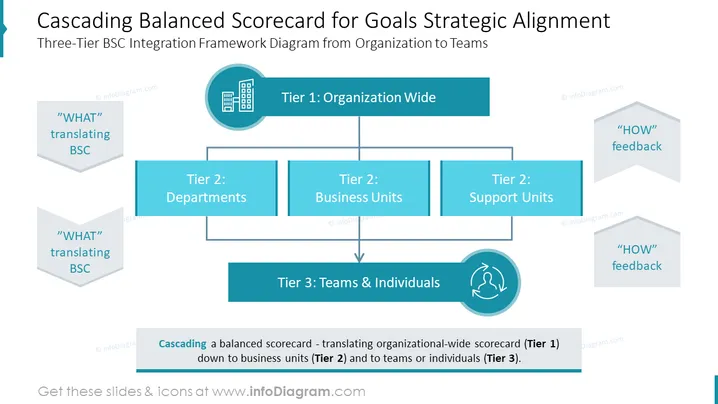
The slide presents a three-tier framework for integrating the Balanced Scorecard (BSC) approach across an organization. Starting with the organization-wide perspective (Tier 1), it cascades down to departments and business units (Tier 2), and further down to teams and individuals (Tier 3). It emphasizes the translation of "WHAT" BSC goals at the Tier 2 level and incorporates "HOW" feedback mechanisms. The process is aimed at ensuring strategic alignment and coherence from the top level of the organization down to the individual contributors.
The slide is designed with a professional color scheme, primarily in shades of blue and grey, set against a white background for clarity. Icons and flow arrows are used to visually distinguish each element and guide the viewer through the content effectively.



