
Reviews
Ihre Grafiken verleihen meinen Präsentationen eine nette Note, und ich habe sie kürzlich für eines meiner All-Hands-Meetings verwendet. Ihre Toolbox verleiht meinen Folien Professionalität, anstatt Standard-Clipart zu verwenden.
Ich brauchte einen neuen Blick auf einige meiner Folien. Ich habe versucht, einen Weg zu finden, einen Pinselschlag-Effekt zu erzielen, um zu unterstreichen, hervorzuheben, Farbe hinzuzufügen, und die handgeschriebenen Markierungen waren genau das Richtige. Sehr einfach zu bedienen, leicht in der Größe zu ändern, die Farbe zu ändern. Es war eine erschwingliche, perfekte Lösung und ich empfehle sie gerne weiter.
Die klare, saubere Optik der Grafiken und die Tatsache, dass ich die Farben leicht bearbeiten und an die Vorlage anpassen konnte, war mein Hauptgrund für den Kauf.
Description
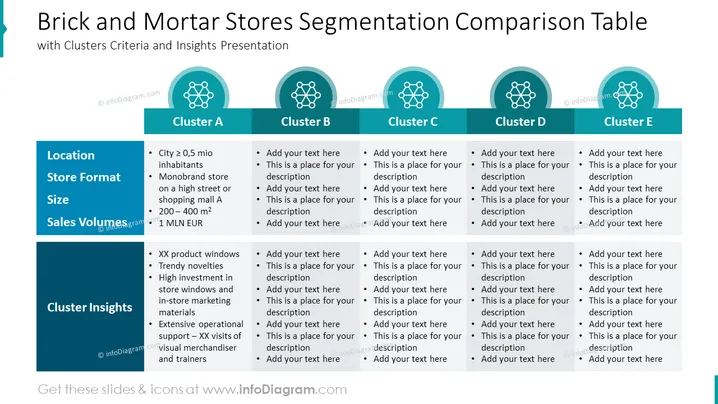
Brick and Mortar Stores Segmentation Comparison Table
Slide Content
The slide presents a comparison table for segmenting brick and mortar stores into five clusters (A through E). Each cluster has criteria and insights provided under categories like Location, Store Format, Size, Sales Volumes, and Cluster Insights. Cluster A is detailed with examples such as a city with over half a million inhabitants, a monobrand store on a high street or shopping mall, a size between 200-400 m², sales volumes over 1 million EUR, and additional insights pertaining to product displays, trendy novelties, investment in store windows and marketing materials, as well as extensive operational support.
Graphical Look
- The slide has a dark blue and teal color scheme with five columns for each store cluster.
- At the top, the slide title is in a larger white font.
- Each cluster column has a title card with rounded corners in teal, displaying the cluster letter and a network icon.
- A horizontal banner below the titles provides categories in white text on a dark blue background.
- Below the banner, each cluster column contains bullet points with placeholder text for detailed information.
- The overall layout is clean and organized; color coding and icons are used to visually separate each cluster's information.
The overall look is polished and professional; teal and dark blue provide a visually appealing contrast and create a sense of structure.
Use Cases
- Utilizing in strategic planning sessions to discuss different store profiles and their corresponding marketing strategies.
- Providing a framework during market segmentation workshops to categorize physical retail locations.
- Aiding in competitive analysis meetings to compare the offerings of various retail store clusters.
- Supporting investment decision-making by outlining the characteristics of different retail market segments.
How to Edit
How to edit text & colors

How to expand / shorten diagram

How to Replace Icons in infoDiagram PPT


