
Reviews
Your graphics add a nice touch to my presentations and I recently used them for one of my all-hands meetings. Your toolbox adds professionalism to my slides. Instead of using standard clipart.
I needed a fresh look at some of my slides. I've tried to find a way to create a paintbrush effect, to underline, accentuate, add some color and the handwritten markers were just the things. Very easy to use, easy to size, change the color. It was an affordable, perfect solution and I'm happy to recommend it.
The crisp, clean look of the graphics, and the fact that it allowed me to easily edit and change the colors to match the template was my main reason for purchasing them.
Description
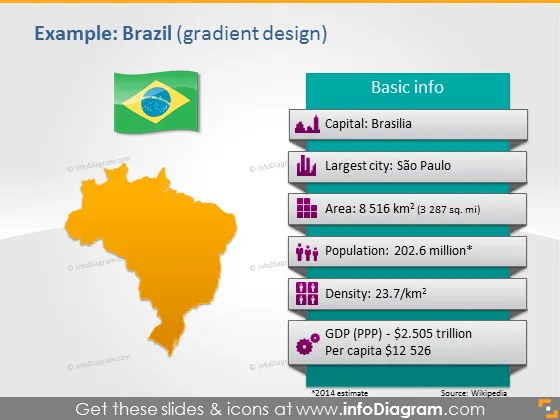
Example: Brazil (gradient design)
Slide Content
The slide provides key information about Brazil in a clear and visually distinct manner. The slide titled "Example: Brazil (gradient design)" features a list of basic facts such as the capital being Brasília; São Paulo as the largest city; an area covering 8,516 km², which equals 3,287 square miles; a substantial population of approximately 202.6 million; a population density of 23.7 people per km²; and an economic overview with a GDP (PPP) of about $2.505 trillion and a per capita income of $12,526.
Graphical Look
- A large orange gradient map of Brazil, centered on the left of the slide, oriented slightly diagonally.
- A Brazilian flag in the upper left corner, aligned with the country's map.
- A title in bold, dark font, aligned to the top right of the slide.
- A "Basic info" label in a blue rectangular banner with a light-to-dark gradient, placed above a vertical series of rectangular information tabs to the right of the map.
- Tabs with rounded corners, each with a different color gradient from light to dark, with corresponding icons, represent different categories of information.
- Purple building icon indicating the capital city.
- Blue skyscraper icon for the largest city.
- Green square icon for the area.
- Purple group of people icon for population.
- Two overlaid squares for density.
- Pink dollar sign within a circle for GDP (PPP).
- Small sourcing text below the last tab, crediting the data to Wikipedia.
The slide uses contrasting colors, with a bright background and vibrant gradients to make the information pop. The use of icons associated with each data point allows for easy visual reference and enhances the overall aesthetic appeal.
Use Cases
- Presentation about international business opportunities showcasing country profiles.
- Educational materials for a geography or social studies class.
- Demographic and economic analysis for a market research presentation.
- Introducing a case study of Brazil in a political science or economics course.
How to Edit
How to edit text & colors

How to expand / shorten diagram

How to Replace Icons in infoDiagram PPT


