
Reviews
Ihre Grafiken verleihen meinen Präsentationen eine nette Note, und ich habe sie kürzlich für eines meiner All-Hands-Meetings verwendet. Ihre Toolbox verleiht meinen Folien Professionalität, anstatt Standard-Clipart zu verwenden.
Ich brauchte einen neuen Blick auf einige meiner Folien. Ich habe versucht, einen Weg zu finden, einen Pinselschlag-Effekt zu erzielen, um zu unterstreichen, hervorzuheben, Farbe hinzuzufügen, und die handgeschriebenen Markierungen waren genau das Richtige. Sehr einfach zu bedienen, leicht in der Größe zu ändern, die Farbe zu ändern. Es war eine erschwingliche, perfekte Lösung und ich empfehle sie gerne weiter.
Die klare, saubere Optik der Grafiken und die Tatsache, dass ich die Farben leicht bearbeiten und an die Vorlage anpassen konnte, war mein Hauptgrund für den Kauf.
Description
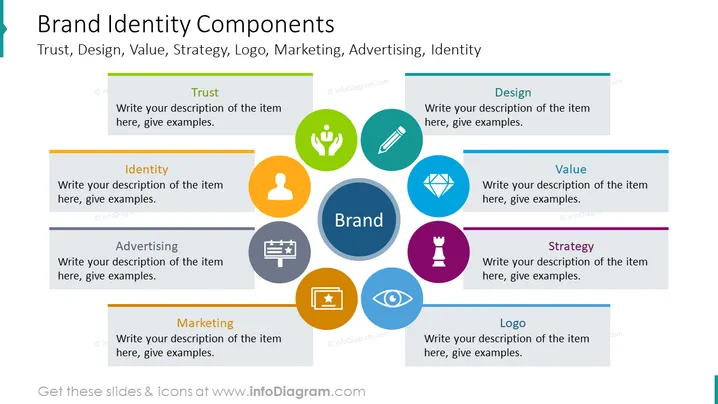
##Slide content This PowerPoint slide shows the Brand Identity Components: trust, design, value, strategy, logo, marketing, advertising, and identity. Trust is consumers' belief in the company's capacity to fulfill its promises. Brand design involves developing a cohesive system of design components such as logos and colors. Brand value is when individuals select one brand over others. Brand strategy is the comprehensive method used to increase a company's recognition and likeability among current and future customers. Logos are pictures, words, or patterns that represent a company's title and mission. Marketing is the process of advertising and selling a company's items. Advertising is referred to as making ads for a company's goods or services. Brand identity is a collection of components that a business uses to develop its image. You can use this PPT slide if you are a corporate manager who wants to explain your company's main identity components. You can download this PPT template on Google Slides and Keynote.
##Slide Infographic Description: White Background, Text Box, Trust Icon, Person Icon, Profile Icon, Advertising Icon, Billboard Icon, Marketing Icon, Logo Icon, Eye Icon, Strategy Icon, Chess Piece Icon, Value Icon, Diamond Icon, Design Icon, Pencil Icon
How to Edit
How to edit text & colors

How to expand / shorten diagram

How to Replace Icons in infoDiagram PPT


