
Reviews
Sus gráficos añaden un toque agradable a mis presentaciones y recientemente los usé para una de mis reuniones generales. Su conjunto de herramientas añade profesionalismo a mis diapositivas. En lugar de usar imágenes prediseñadas estándar.
Necesitaba un aspecto fresco para algunas de mis diapositivas. Había intentado encontrar una forma de crear un efecto de pincel, de subrayar, acentuar, añadir algo de color y los marcadores escritos a mano fueron justo lo que necesitaba. Muy fácil de usar, fácil de ajustar el tamaño, cambiar el color. Fue una solución asequible y perfecta, y estoy feliz de recomendarla.
El aspecto nítido y limpio de los gráficos, y el hecho de que me permitiera editar y cambiar fácilmente los colores para que coincidieran con la plantilla fue mi principal razón para comprarlos.
Description
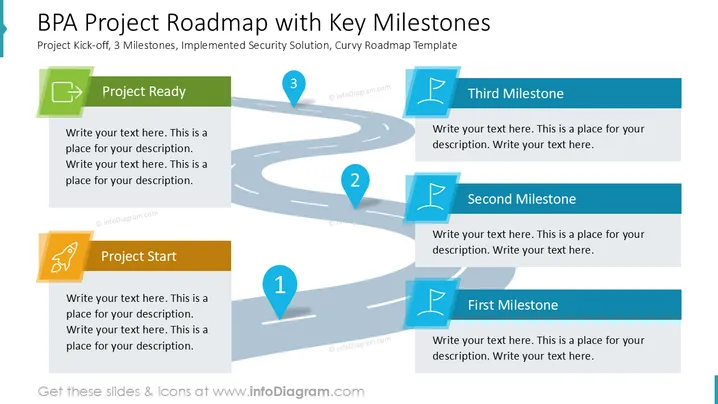
BPA Project Roadmap with Key Milestones
Slide Content
The slide outlines a project roadmap featuring key milestones for a BPA project. It includes a curvy path guiding through various stages. "Project Start" initiates the plan with an essential kickoff phase. "First Milestone" marks the first significant achievement. "Second Milestone" signifies continued progress within the project. "Third Milestone" indicates nearing project completion. "Project Ready" wraps up with the project's finalization and readiness for implementation.
Graphical Look
- The slide features a winding road graphic traversing from the bottom left to the top right.
- Round numbered markers with numbers 1 to 3 identify milestone points along the road.
- Each milestone box is aligned with corresponding numbered markers on the road.
- Rectangular colored boxes with icons represent different project phases, including an icon for each phase.
- The use of vibrant colors—green, orange, and blue—visually differentiates each milestone.
- A rocket icon symbolizes the start of the project; flag icons represent milestones and completion.
The slide presents a visually appealing roadmap with a clear progression of stages. The winding road and distinct colored boxes with icons add clarity and engagement.
Use Cases
- Presenting a project timeline in stakeholder meetings.
- Visualizing strategic planning sessions for upcoming projects.
- Mapping out key objectives in a project kickoff meeting.
- Illustrating a workflow during training and onboarding sessions.
How to Edit
How to edit text & colors

How to expand / shorten diagram

How to Replace Icons in infoDiagram PPT


