
Reviews
Sus gráficos añaden un toque agradable a mis presentaciones y recientemente los usé para una de mis reuniones generales. Su conjunto de herramientas añade profesionalismo a mis diapositivas. En lugar de usar imágenes prediseñadas estándar.
Necesitaba un aspecto fresco para algunas de mis diapositivas. Había intentado encontrar una forma de crear un efecto de pincel, de subrayar, acentuar, añadir algo de color y los marcadores escritos a mano fueron justo lo que necesitaba. Muy fácil de usar, fácil de ajustar el tamaño, cambiar el color. Fue una solución asequible y perfecta, y estoy feliz de recomendarla.
El aspecto nítido y limpio de los gráficos, y el hecho de que me permitiera editar y cambiar fácilmente los colores para que coincidieran con la plantilla fue mi principal razón para comprarlos.
Description
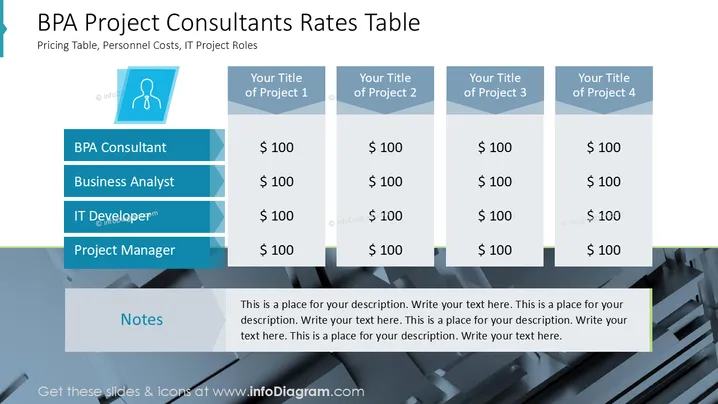
BPA Project Consultants Rates Table
Slide Content
The slide titled "BPA Project Consultants Rates Table" outlines the pricing structure for various IT project roles. It highlights four roles: BPA Consultant, Business Analyst, IT Developer, and Project Manager, each priced at $100 across four projects titled as Project 1, Project 2, Project 3, and Project 4. This table format allows easy comparison of personnel costs on a per-project basis, offering clarity on the financial aspects of these roles within IT projects.
Graphical Look
- The slide features a simple, structured layout with a white background.
- A blue icon with a suited person silhouette is present on the left.
- Roles are displayed inside blue rectangles aligned in a vertical manner.
- Columns representing projects are shown as gray rectangles with light blue headers.
- A notes section spanning the slide's width is located at the bottom, with text placeholders.
- All text is clear and legible, using a combination of bold and standard fonts.
- The color scheme combines blue, gray, and white for a professional appearance.
The overall slide maintains a clean and professional look, providing clarity through a straightforward color scheme and structured layout. It effectively balances text with graphical elements for easy readability.
Use Cases
- Budget Presentations: Ideal for presenting financial data in meetings.
- IT Planning: Useful in resource allocation discussions for IT projects.
- Team Meetings: Can help clarify staffing costs for various roles.
- Client Proposals: Demonstrates cost structures to potential clients.
How to Edit
How to edit text & colors

How to expand / shorten diagram

How to Replace Icons in infoDiagram PPT


