
Reviews
Sus gráficos añaden un toque agradable a mis presentaciones y recientemente los usé para una de mis reuniones generales. Su conjunto de herramientas añade profesionalismo a mis diapositivas. En lugar de usar imágenes prediseñadas estándar.
Necesitaba un aspecto fresco para algunas de mis diapositivas. Había intentado encontrar una forma de crear un efecto de pincel, de subrayar, acentuar, añadir algo de color y los marcadores escritos a mano fueron justo lo que necesitaba. Muy fácil de usar, fácil de ajustar el tamaño, cambiar el color. Fue una solución asequible y perfecta, y estoy feliz de recomendarla.
El aspecto nítido y limpio de los gráficos, y el hecho de que me permitiera editar y cambiar fácilmente los colores para que coincidieran con la plantilla fue mi principal razón para comprarlos.
Description
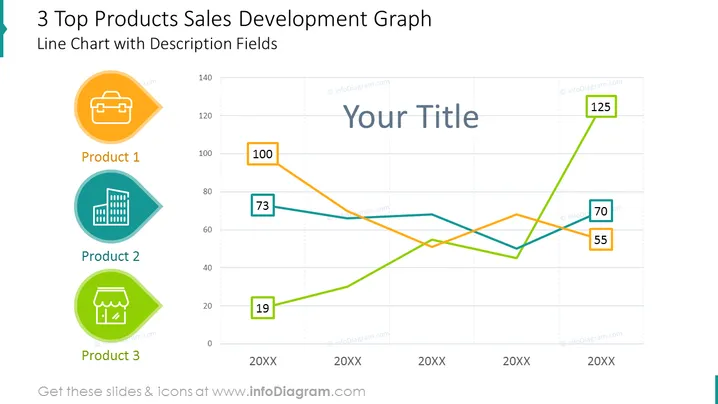
3 Top Products Sales Development Graph
Slide Content
The slide is titled "3 Top Products Sales Development Graph" and includes a Line Chart with Description Fields. It visually represents the sales development of three products over three time points labeled "20XX". The products are individually associated with colored lines and labeled with unique icons — a briefcase for Product 1, a building for Product 2, and a storefront for Product 3. Data points are marked with values such as 100, 73, and 125 for Product 1, indicating different sales figures at each time point.
Graphical Look
- The slide's background is white, with grid lines creating a subtle graph paper effect.
- Three colored lines represent the sales trends of the products: orange for Product 1, blue for Product 2, and green for Product 3.
- Each product has an associated icon within a differently colored circular shape with a pointed edge directed towards the line graph: an orange circle with a briefcase for Product 1, a blue circle with a building for Product 2, and a green circle with a storefront for Product 3.
- Data point values are displayed within rectangular callout boxes placed at significant points along each line.
- The title "Your Title" is centered at the top of the line graph, suggesting a placeholder for a custom title.
- The slide's composition is clean and balanced, with graphic elements like icons and data points coordinating with corresponding line colors.
The overall look of the slide is professional and clear, with a focus on the line graph that effectively conveys the sales data of three distinct products. The use of color and icons helps to differentiate between the products, making the information easily understandable at a glance.
Use Cases
- To present quarterly sales trends for different products in a company meeting.
- For comparing the performance of top-selling products in a marketing presentation.
- In investor briefings to illustrate the growth or decline of key products over time .
- To showcase market research data about product popularity or market share during a business strategy session.
How to Edit
How to edit text & colors

How to expand / shorten diagram

How to Replace Icons in infoDiagram PPT


