

Your graphics add a nice touch to my presentations and I recently used them for one of my all-hands meetings. Your toolbox adds professionalism to my slides. Instead of using standard clipart.
Claude Jones, Director of Engineer, @Walmartlabs, USA

Your graphics add a nice touch to my presentations and I recently used them for one of my all-hands meetings. Your toolbox adds professionalism to my slides. Instead of using standard clipart.
Claude Jones, Director of Engineer, @Walmartlabs, USA
I needed a fresh look at some of my slides. I've tried to find a way to create a paintbrush effect, to underline, accentuate, add some color and the handwritten markers were just the things. Very easy to use, easy to size, change the color. It was an affordable, perfect solution and I'm happy to recommend it.
Anonymous, US
The crisp, clean look of the graphics, and the fact that it allowed me to easily edit and change the colors to match the template was my main reason for purchasing them.
Brandie Jenkins, E-learning Developer, USA
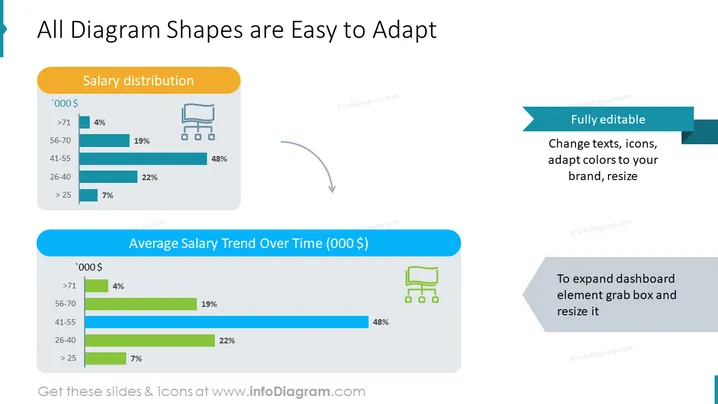
The PowerPoint slide "All Diagram Shapes are Easy to Adapt" demonstrates the customizability of diagram shapes within a presentation. Two key elements are displayed: "Salary distribution" and "Average Salary Trend Over Time (000 $)," which provide data visualizations implying financial analytics. The "Salary distribution" appears to show percentages of individuals across different income brackets, indicating, for instance, that 48% are within the 41-55 '000 $ range. "Average Salary Trend Over Time" suggests tracking salary changes over a certain period, with 48% representation in the same 41-55 '000 $ bracket. Adjacent to the graphics are notes emphasizing that the content is "Fully editable," meaning texts, icons, and colors can be adapted to fit a particular brand, along with the capability to resize elements.
The slide has a clean, modern design with a crisp white background. The charts are minimalist with a focus on functionality, and the use of color is consistent and strategic to differentiate between sections and emphasize the adaptability of the chart elements.



