

Your graphics add a nice touch to my presentations and I recently used them for one of my all-hands meetings. Your toolbox adds professionalism to my slides. Instead of using standard clipart.
Claude Jones, Director of Engineer, @Walmartlabs, USA

Your graphics add a nice touch to my presentations and I recently used them for one of my all-hands meetings. Your toolbox adds professionalism to my slides. Instead of using standard clipart.
Claude Jones, Director of Engineer, @Walmartlabs, USA
I needed a fresh look at some of my slides. I've tried to find a way to create a paintbrush effect, to underline, accentuate, add some color and the handwritten markers were just the things. Very easy to use, easy to size, change the color. It was an affordable, perfect solution and I'm happy to recommend it.
Anonymous, US
The crisp, clean look of the graphics, and the fact that it allowed me to easily edit and change the colors to match the template was my main reason for purchasing them.
Brandie Jenkins, E-learning Developer, USA
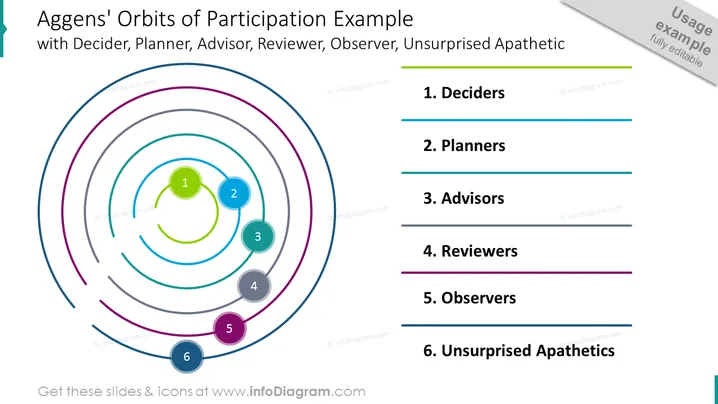
The slide presents the 'Aggens' Orbits of Participation Example,' which is a conceptual framework illustrating different roles in a decision-making process. Each role is represented by a colored orbital path: 1. Deciders make final decisions, 2. Planners organize and prepare, 3. Advisors provide expertise, 4. Reviewers evaluate and give feedback, 5. Observers monitor without direct engagement, and 6. Unsurprised Apathetics are informed but indifferent.
The slide has a dynamic, visually engaging layout with vibrant colors that help distinguish the different orbits and associated roles. The design is professional, clean, and well-structured, making it easy to understand the hierarchy and flow of the participation model.



