
Reviews
Ihre Grafiken verleihen meinen Präsentationen eine nette Note, und ich habe sie kürzlich für eines meiner All-Hands-Meetings verwendet. Ihre Toolbox verleiht meinen Folien Professionalität, anstatt Standard-Clipart zu verwenden.
Ich brauchte einen neuen Blick auf einige meiner Folien. Ich habe versucht, einen Weg zu finden, einen Pinselschlag-Effekt zu erzielen, um zu unterstreichen, hervorzuheben, Farbe hinzuzufügen, und die handgeschriebenen Markierungen waren genau das Richtige. Sehr einfach zu bedienen, leicht in der Größe zu ändern, die Farbe zu ändern. Es war eine erschwingliche, perfekte Lösung und ich empfehle sie gerne weiter.
Die klare, saubere Optik der Grafiken und die Tatsache, dass ich die Farben leicht bearbeiten und an die Vorlage anpassen konnte, war mein Hauptgrund für den Kauf.
Description
Failed Actions Summary Template
Slide Content
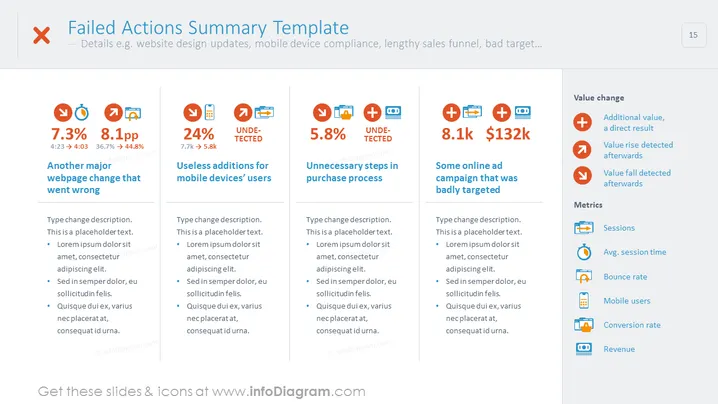
The slide titled "Failed Actions Summary Template" appears to break down various unsuccessful strategies or actions within a business context, such as a webpage change that went wrong, useless additions for mobile device users, unnecessary steps in a purchasing process, and an online ad campaign that was poorly targeted. Each category contains statistics like percentage changes and numerical values. Descriptions and bullet points below the headers suggest detailed analysis of each failure. Additionally, there is a side panel detailing different value changes and metrics that are significant to the discussion, such as session count and revenue changes.
Graphical Look
- Four main content blocks each featuring different colors: orange, red, blue, and green.
- Each block has a title, a set of icons representing the type of failure, and numbers with percentage changes.
- The icons include a downward-facing arrow (indicating a decrease), a newspaper (perhaps symbolizing news or updates), and a mobile phone (indicating mobile-related content).
- A vertical list to the right-hand side of the slide presents icons followed by words, apparently summarizing different values and metrics linked to the main content.
- The content boxes are separated by thin grey lines, and each has two contrasting numeric values showing the extent of the change or result.
- Each main block includes additional text and bullet points, in placeholder text format, for detailed descriptions.
The slide has a balanced layout with a professional color scheme and a clear segregation of content. The use of icons and contrasting numeric indicators provides a quick visual representation of performance metrics.
Use Cases
- To present post-mortem analysis of marketing or sales efforts in a business meeting.
- In performance review presentations to highlight areas in need of improvement.
- During strategic planning to discuss past failures and devise future tactics.
- For training purposes, illustrating examples of what not to do in future campaigns or strategies.
How to Edit
How to edit text & colors

How to expand / shorten diagram

How to Replace Icons in infoDiagram PPT


