

Your graphics add a nice touch to my presentations and I recently used them for one of my all-hands meetings. Your toolbox adds professionalism to my slides. Instead of using standard clipart.
Claude Jones, Director of Engineer, @Walmartlabs, USA

Your graphics add a nice touch to my presentations and I recently used them for one of my all-hands meetings. Your toolbox adds professionalism to my slides. Instead of using standard clipart.
Claude Jones, Director of Engineer, @Walmartlabs, USA
I needed a fresh look at some of my slides. I've tried to find a way to create a paintbrush effect, to underline, accentuate, add some color and the handwritten markers were just the things. Very easy to use, easy to size, change the color. It was an affordable, perfect solution and I'm happy to recommend it.
Anonymous, US
The crisp, clean look of the graphics, and the fact that it allowed me to easily edit and change the colors to match the template was my main reason for purchasing them.
Brandie Jenkins, E-learning Developer, USA
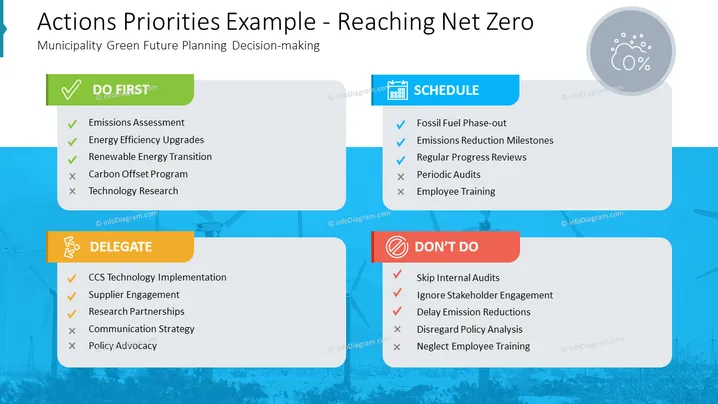
The slide is about priority actions needed for a municipality's green future planning aimed at reaching net zero. Under "DO FIRST," it lists Emissions Assessment, Energy Efficiency Upgrades, Renewable Energy Transition as important initial steps while suggesting Carbon Offset Program, and Technology Research can wait. "DELEGATE" relates to actions like CCS Technology Implementation and Supplier Engagement, which may be assigned to others. "SCHEDULE" implies setting up milestones for Fossil Fuel Phase-out and Emissions Reduction. "DON'T DO" includes actions to avoid, like Skipping Internal Audits or Ignoring Stakeholder Engagement.
The overall look is modern and visually engaging, using a mix of vibrant colors and icons to clearly categorize the priority actions. The use of checks and crosses effectively communicates the do's and don'ts in planning for net zero.



