
Reviews
Your graphics add a nice touch to my presentations and I recently used them for one of my all-hands meetings. Your toolbox adds professionalism to my slides. Instead of using standard clipart.
I needed a fresh look at some of my slides. I've tried to find a way to create a paintbrush effect, to underline, accentuate, add some color and the handwritten markers were just the things. Very easy to use, easy to size, change the color. It was an affordable, perfect solution and I'm happy to recommend it.
The crisp, clean look of the graphics, and the fact that it allowed me to easily edit and change the colors to match the template was my main reason for purchasing them.
Description
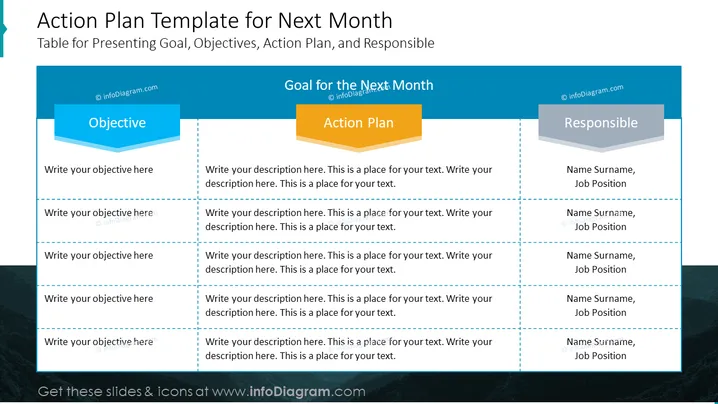
Action Plan Template for Next Month
Slide Content
The slide titled "Action Plan Template for Next Month" is designed to structure the presentation of goals, objectives, action plans, and responsibilities for an upcoming month. It is divided into three columns: "Objective" clarifies what needs to be accomplished; "Action Plan" outlines the steps to achieve the objectives; and "Responsible" assigns individuals to each task, providing their name and job position, ensuring accountability and clear ownership of each action item.
Graphical Look
- The slide features a dark blue header with the title in white, large font centered at the top.
- Three primary columns are present, each headed by a 3D-effect, colored banner with titles: "Objective" (blue), "Action Plan" (orange), and "Responsible" (grey).
- Each column includes multiple rows for inputting specific details, demarcated by dashed lines.
- The "Objective" and "Responsible" columns have blue backgrounds, emphasizing these sections, while the "Action Plan" maintains a white background for contrast.
- Text placeholders with a lighter blue watermark instruct the presenter where to insert relevant text.
- The overall color scheme is professional, utilizing shades of blue, orange for action emphasis, and grey for responsibility.
The slide is clean and professional with a clear color-coded system to delineate different sections. The 3D effect on the colored banners adds depth to the design, enhancing visual appeal.
Use Cases
- Planning and presenting monthly goals and actions in team meetings or departmental reviews.
- Assigning tasks and responsibilities during project management meetings.
- Structuring performance review sessions to track progress against specific objectives.
- Strategic planning sessions where next steps and assigned leads are clearly communicated to team members.
How to Edit
How to edit text & colors

How to expand / shorten diagram

How to Replace Icons in infoDiagram PPT


