
Reviews
Your graphics add a nice touch to my presentations and I recently used them for one of my all-hands meetings. Your toolbox adds professionalism to my slides. Instead of using standard clipart.
I needed a fresh look at some of my slides. I've tried to find a way to create a paintbrush effect, to underline, accentuate, add some color and the handwritten markers were just the things. Very easy to use, easy to size, change the color. It was an affordable, perfect solution and I'm happy to recommend it.
The crisp, clean look of the graphics, and the fact that it allowed me to easily edit and change the colors to match the template was my main reason for purchasing them.
Description
Account Receivables Dashboard
Slide Content
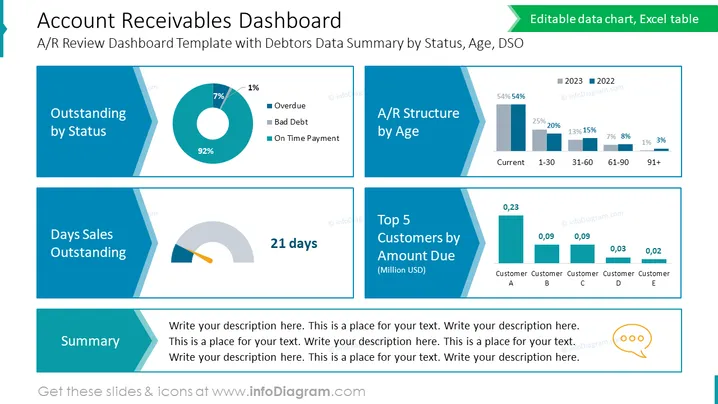
This slide is titled "Account Receivables Dashboard" and is subtitled "A/R Review Dashboard Template with Debtors Data Summary by Status, Age, DSO." It presents various graphical representations of financial data. "Outstanding by Status" shows a donut chart with the majority of the segment indicating "On Time Payment." "A/R Structure by Age" displays a horizontal bar graph comparing amounts for different age groups over two years. "Days Sales Outstanding" features a semi-circular gauge with a marker pointing at "21 days." Lastly, "Top 5 Customers by Amount Due" includes a stacked bar chart in millions USD for five different customers.
Graphical Look
- The slide utilizes a clean, professional design with a color scheme of blue, gray, and green.
- There are four main content boxes, each with its own header and chart/graph.
- The "Outstanding by Status" section includes a donut chart with three colors representing different payment statuses.
- The "A/R Structure by Age" section shows a horizontal bar graph with two shades representing different years.
- The "Days Sales Outstanding" section has a semi-circular gray gauge with a yellow pointer.
- The "Top 5 Customers by Amount Due" uses a stacked bar chart with five segments in descending order.
- Each content box includes editable text fields for descriptions and data interpretation.
The overall look of the slide provides a clear and concise visual representation of the data, with each section separated for easy readability and interpretability. The colors are chosen to distinguish different data points effectively while maintaining a professional appearance.
Use Cases
- To present financial summary updates in corporate meetings and reviews.
- To illustrate accounts receivable metrics in financial reporting or investor relations presentations.
- In a workshop or training session focused on accounts receivable management and analysis.
- As part of a dashboard in financial software demonstrations or tutorials.
How to Edit
How to edit text & colors

How to expand / shorten diagram

How to Replace Icons in infoDiagram PPT


