
Reviews
Your graphics add a nice touch to my presentations and I recently used them for one of my all-hands meetings. Your toolbox adds professionalism to my slides. Instead of using standard clipart.
I needed a fresh look at some of my slides. I've tried to find a way to create a paintbrush effect, to underline, accentuate, add some color and the handwritten markers were just the things. Very easy to use, easy to size, change the color. It was an affordable, perfect solution and I'm happy to recommend it.
The crisp, clean look of the graphics, and the fact that it allowed me to easily edit and change the colors to match the template was my main reason for purchasing them.
Description
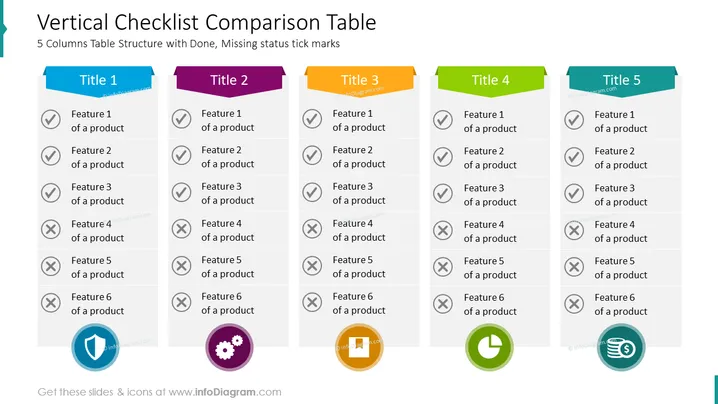
Vertical Checklist Comparison Table
Slide Content
The PowerPoint slide titled "Vertical Checklist Comparison Table" is designed for comparing the features of five different products or services across five columns. Each column is headed by a "Title" cell and contains a list of six features with check marks (✓) or crosses (✖) to denote whether the feature is present or missing, respectively. This structure allows for a clear visual comparison of which features are shared or unique to each product or service. Below each column, there's an emblematic icon associated with the product or service, reinforcing the comparison visually.
Graphical Look
- The slide background is white.
- At the top, there is a dark blue ribbon bar banner with the title in white text.
- There are five columns with distinct color headers labeled "Title 1" through "Title 5" in shades of blue, purple, orange, green, and teal.
- Each column header has a ribbon-like fold effect on the left side.
- Every column consists of a light gray table with six rows representing product features.
- Each feature row has either a check mark or cross icon indicating the feature's presence or absence.
- The check marks are in a circle with a light green fill, and the crosses are in a circle with a light red fill.
- At the bottom of each column, there is a colored icon that relates to the product: a shield for Title 1, gears for Title 2, a trophy for Title 3, a clock for Title 4, and a hand with money for Title 5.
- The shield, gears, trophy, clock, and hand with money icons have their respective background color matching the column headers.
The slide is clean and well-structured, using color-coding and icons to enhance readability. The contrasting check and cross icons provide an immediate visual cue for comparing features.
Use Cases
- To compare product offerings side by side for internal strategic meetings or business analysis - To present competitive analysis to stakeholders, highlighting strengths and weaknesses compared to competitors' products.
- In sales presentations to customers, to showcase the advantages of a product over other market options.
- For internal training, to educate staff on the differentiating factors of each product or service the company offers.
How to Edit
How to edit text & colors

How to expand / shorten diagram

How to Replace Icons in infoDiagram PPT


