
Reviews
Sus gráficos añaden un toque agradable a mis presentaciones y recientemente los usé para una de mis reuniones generales. Su conjunto de herramientas añade profesionalismo a mis diapositivas. En lugar de usar imágenes prediseñadas estándar.
Necesitaba un aspecto fresco para algunas de mis diapositivas. Había intentado encontrar una forma de crear un efecto de pincel, de subrayar, acentuar, añadir algo de color y los marcadores escritos a mano fueron justo lo que necesitaba. Muy fácil de usar, fácil de ajustar el tamaño, cambiar el color. Fue una solución asequible y perfecta, y estoy feliz de recomendarla.
El aspecto nítido y limpio de los gráficos, y el hecho de que me permitiera editar y cambiar fácilmente los colores para que coincidieran con la plantilla fue mi principal razón para comprarlos.
Description
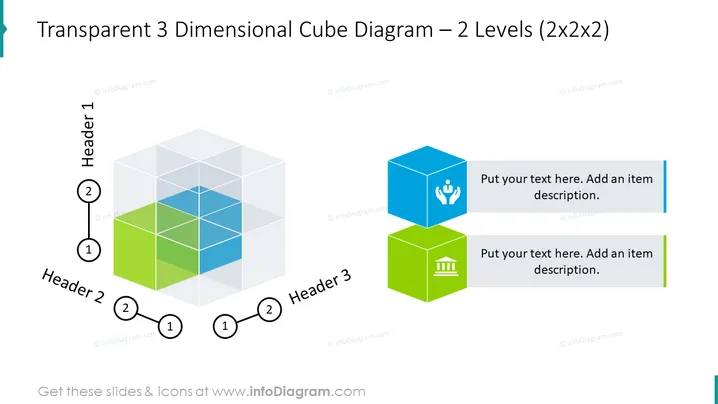
Transparent 3 Dimensional Cube Diagram – 2 Levels (2x2x2)
Slide Content
The slide presents a Transparent 3 Dimensional Cube Diagram with 2 Levels labeled as "2x2x2." This diagram consists of four smaller cubes assembled together to form a larger cubic structure separated into Header 1, Header 2, and Header 3 sections. Each header corresponds to a different smaller cube, indicating that each part can represent a distinct idea or concept. The smaller cubes are presented in a translucent style, with two of them colored in blue and green shades.
Graphical Look
- The main graphic is a transparent cubic structure comprising four smaller cubes.
- Two smaller cubes are distinguished by blue and green fill colors to denote different sections.
- Each colored cube has a matching icon symbol atop it: one with a hand symbol and the other with a building-like icon.
- Next to each symbolized cube is a rectangular text box for additional descriptions.
- The slide uses thin, solid lines for text boxes and connecting lines for clarity.
- Numerical labels "1" and "2" appear near the cube and its corresponding description to indicate a sequence or relationship.
- Each section header ("Header 1," "Header 2," "Header 3") is associated with black lines connecting to their respective cubes.
- The slide background is white, allowing for maximum contrast with the colored graphics.
The slide offers a clean and modern design with a balance between visual elements and textual information provided in the description boxes. It utilizes a minimalistic color palette to emphasize the structure and hierarchy of concepts within the 3D cube diagram.
Use Cases
- To illustrate a business model with interrelated components at multiple levels.
- For presenting organizational structures or product categories in a corporate presentation.
- In strategy meetings, to discuss different aspects of a new project or initiative.
- Useful for providing a visual breakdown of complex systems or processes to stakeholders.
How to Edit
How to edit text & colors

How to expand / shorten diagram

How to Replace Icons in infoDiagram PPT


