
Your graphics add a nice touch to my presentations and I recently used them for one of my all-hands meetings. Your toolbox adds professionalism to my slides. Instead of using standard clipart.
Claude Jones, Director of Engineer, @Walmartlabs, USA

Your graphics add a nice touch to my presentations and I recently used them for one of my all-hands meetings. Your toolbox adds professionalism to my slides. Instead of using standard clipart.
Claude Jones, Director of Engineer, @Walmartlabs, USA

I needed a fresh look at some of my slides. I've tried to find a way to create a paintbrush effect, to underline, accentuate, add some color and the handwritten markers were just the things. Very easy to use, easy to size, change the color. It was an affordable, perfect solution and I'm happy to recommend it.
Anonymous, US
The crisp, clean look of the graphics, and the fact that it allowed me to easily edit and change the colors to match the template was my main reason for purchasing them.
Brandie Jenkins, E-learning Developer, USA
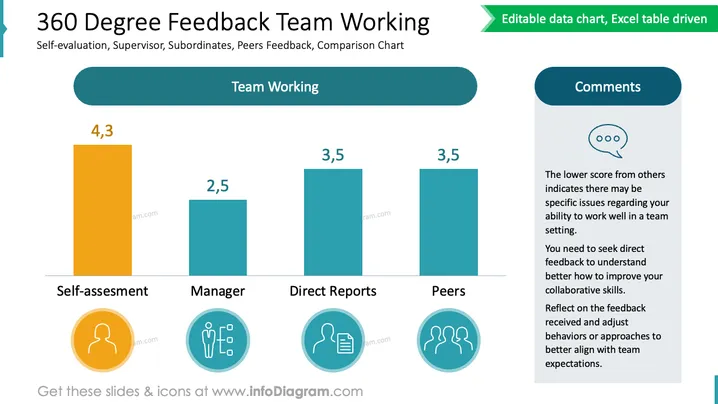
The slide presents a comparison chart of 360-degree feedback on team working skills from different perspectives: self-assessment, manager, direct reports, and peers. Each category has a corresponding bar with a numeric score above it. The tallest bar, labeled "Self-assessment," has a score of 4.3, suggesting a high self-rating. The "Manager" category has the lowest score at 2.5, indicating a differing viewpoint from the manager's perspective. Both "Direct Reports" and "Peers" categories have identical scores of 3.5. A comments section on the right suggests seeking direct feedback to understand how to improve collaborative skills and align with team expectations, indicating that the lower scores from others require attention and reflection to improve teamwork.
The slide has a clean and professional layout, using a contrasting color scheme to distinguish the self-assessment from the other categories. The use of icons helps to visually represent the different sources of feedback.


