
Reviews
Ihre Grafiken verleihen meinen Präsentationen eine nette Note, und ich habe sie kürzlich für eines meiner All-Hands-Meetings verwendet. Ihre Toolbox verleiht meinen Folien Professionalität, anstatt Standard-Clipart zu verwenden.
Ich brauchte einen neuen Blick auf einige meiner Folien. Ich habe versucht, einen Weg zu finden, einen Pinselschlag-Effekt zu erzielen, um zu unterstreichen, hervorzuheben, Farbe hinzuzufügen, und die handgeschriebenen Markierungen waren genau das Richtige. Sehr einfach zu bedienen, leicht in der Größe zu ändern, die Farbe zu ändern. Es war eine erschwingliche, perfekte Lösung und ich empfehle sie gerne weiter.
Die klare, saubere Optik der Grafiken und die Tatsache, dass ich die Farben leicht bearbeiten und an die Vorlage anpassen konnte, war mein Hauptgrund für den Kauf.
Description
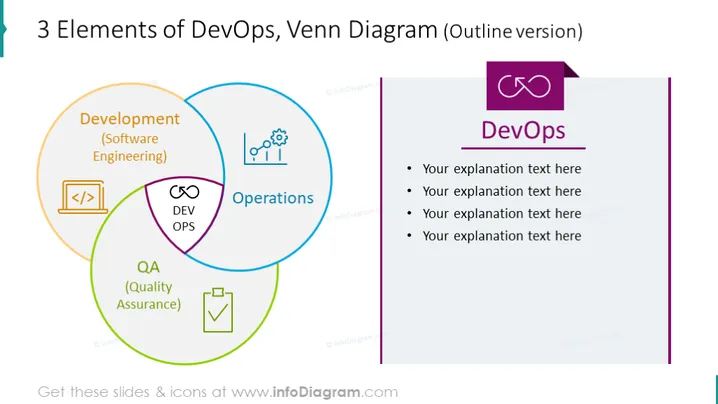
3 Elements of DevOps, Venn Diagram (Outline version)
Slide Content
The slide represents the integration of three core elements of DevOps using a Venn diagram: Development (Software Engineering), Operations, and QA (Quality Assurance). Each circle is labeled with its respective element and is accompanied by a representative icon; a "< />" icon for Development, a cogwheel and bar graph for Operations, and a checkmark on a document for QA, with DEV OPS written at the intersection of all three, signifying the synergy that DevOps aims to achieve.
Graphical Look
- The slide background is plain white which helps the content to stand out.
- A large, colorful Venn diagram dominates the left side of the slide, with each of the three circles outlined in a distinct color—orange for Development, blue for Operations, and green for QA.
- Each circle in the Venn diagram includes a glyph icon corresponding to its component; a code bracket for Development, cogwheel and graph for Operations, and a checklist for QA.
- In the center where all circles overlap, there is a label "DEV OPS" enclosed in a purple band that stands out against the multicolor background.
- To the right, a vertical rectangular text box contains the heading "DevOps" with a purple banner on top and four bullet points, each preceded by a bullet icon, ready for customization.
The slide's design is a blend of bold colors and clear, simple graphics. It provides a visual breakdown of concepts that are central to DevOps and does so in a manner that is easily understood at a glance.
Use Cases
- To introduce the concept of DevOps in a training or educational session.
- During a business meeting to discuss the implementation or improvement of DevOps practices within an organization.
- In a sales or consulting presentation to highlight how products or services interlink with DevOps elements.
- As part of a workshop to brainstorm how the integration of Development, Operations, and Quality Assurance can be optimized within a team or project.
How to Edit
How to edit text & colors

How to expand / shorten diagram

How to Replace Icons in infoDiagram PPT


