Timeline arrows – 4 items

Slide Content

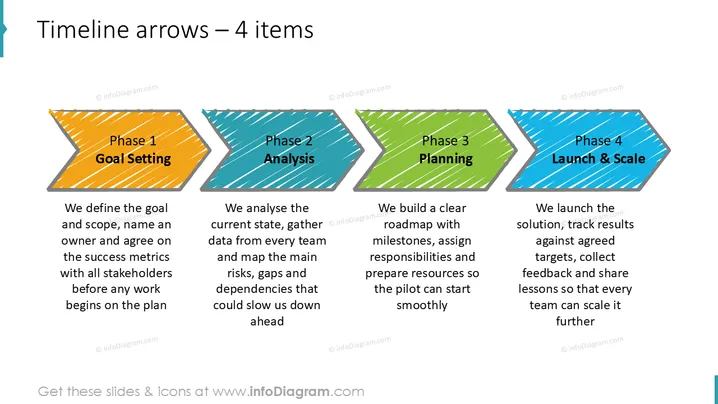
This slide outlines a four-phase project timeline using arrows. It starts with Phase 1: Goal Setting, where objectives, scope, ownership, and success metrics are defined. Next is Phase 2: Analysis, involving current state assessment, data gathering, and identification of risks and dependencies. Phase 3: Planning focuses on building a roadmap, assigning responsibilities, and preparing resources. Finally, Phase 4: Launch & Scale details the solution launch, result tracking, feedback collection, and sharing lessons for future scaling.

Graphical Look

  • The slide has a clean white background.
  • At the top left, there's a small teal square.
  • The title "Timeline arrows – 4 items" is displayed in large black text at the top.
  • Four chevron-shaped arrows are aligned horizontally across the middle of the slide, pointing to the right, creating a visual flow.
  • Each arrow is filled with a distinct color and a sketch-like, textured pattern, outlined in a dark gray.
  • The first arrow is orange, labeled "Phase 1 Goal Setting".
  • The second and fourth arrows are teal, labeled "Phase 2 Analysis" and "Phase 4 Launch & Scale" respectively.
  • The third arrow is light green, labeled "Phase 3 Planning".
  • Below each arrow, there is a block of black text explaining the details of that phase, aligned centrally with its corresponding arrow.

The overall look is structured and organized, utilizing color and shape to clearly differentiate and progress through the timeline stages. The hand-drawn texture gives the slide a slightly informal yet engaging aesthetic.

Use Cases

  • Project Management Meetings: To present the different phases of a project, highlighting key activities and responsibilities at each stage.
  • Strategic Planning Sessions: To outline a strategic roadmap, showing the sequence of initiatives from conception to execution.
  • Product Development Presentations: To illustrate the journey of a product from ideation and analysis to launch and scaling.
  • Educational or Training Material: To explain processes or workflows in a clear, step-by-step manner.
Timeline arrows – 4 items

Timeline arrows – 4 items

Part of deckInfográficos desenhados à mão, diagramas e símbolos rabiscados (formas PPT)