

Your graphics add a nice touch to my presentations and I recently used them for one of my all-hands meetings. Your toolbox adds professionalism to my slides. Instead of using standard clipart.
Claude Jones, Director of Engineer, @Walmartlabs, USA

Your graphics add a nice touch to my presentations and I recently used them for one of my all-hands meetings. Your toolbox adds professionalism to my slides. Instead of using standard clipart.
Claude Jones, Director of Engineer, @Walmartlabs, USA
I needed a fresh look at some of my slides. I've tried to find a way to create a paintbrush effect, to underline, accentuate, add some color and the handwritten markers were just the things. Very easy to use, easy to size, change the color. It was an affordable, perfect solution and I'm happy to recommend it.
Anonymous, US
The crisp, clean look of the graphics, and the fact that it allowed me to easily edit and change the colors to match the template was my main reason for purchasing them.
Brandie Jenkins, E-learning Developer, USA
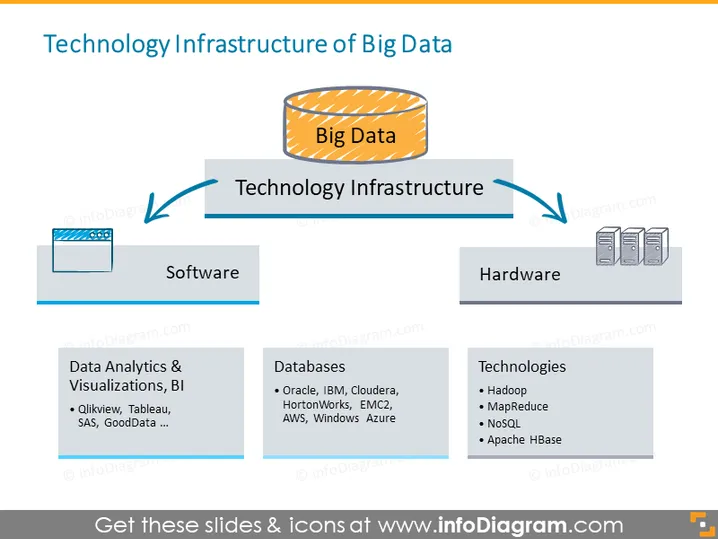
O slide ilustra os componentes centrais que compõem a Infraestrutura Tecnológica de Big Data. Há um conceito central, "Big Data," conectado a duas categorias amplas: 'Software' e 'Hardware.' Cada categoria possui uma lista respectiva que expande os tipos de software e hardware utilizados. Para software, 'Análises de Dados & Visualizações, BI' inclui ferramentas como Qlikview, Tableau, SAS e GoodData. Em termos de bancos de dados, os exemplos dados são Oracle, IBM e Cloudera. O lado do hardware lista 'Tecnologias' como Hadoop, MapReduce, NoSQL e Apache HBase, indicativo da variedade de tecnologias usadas para lidar com o processamento e armazenamento de big data.
O slide usa um layout claro e direto com um ponto focal central e categorias associadas que se ramificam. O uso de ícones e a disposição proporcionam uma representação visual fácil de seguir da relação entre Big Data e sua infraestrutura tecnológica subjacente.



