

Your graphics add a nice touch to my presentations and I recently used them for one of my all-hands meetings. Your toolbox adds professionalism to my slides. Instead of using standard clipart.
Claude Jones, Director of Engineer, @Walmartlabs, USA

Your graphics add a nice touch to my presentations and I recently used them for one of my all-hands meetings. Your toolbox adds professionalism to my slides. Instead of using standard clipart.
Claude Jones, Director of Engineer, @Walmartlabs, USA
I needed a fresh look at some of my slides. I've tried to find a way to create a paintbrush effect, to underline, accentuate, add some color and the handwritten markers were just the things. Very easy to use, easy to size, change the color. It was an affordable, perfect solution and I'm happy to recommend it.
Anonymous, US
The crisp, clean look of the graphics, and the fact that it allowed me to easily edit and change the colors to match the template was my main reason for purchasing them.
Brandie Jenkins, E-learning Developer, USA
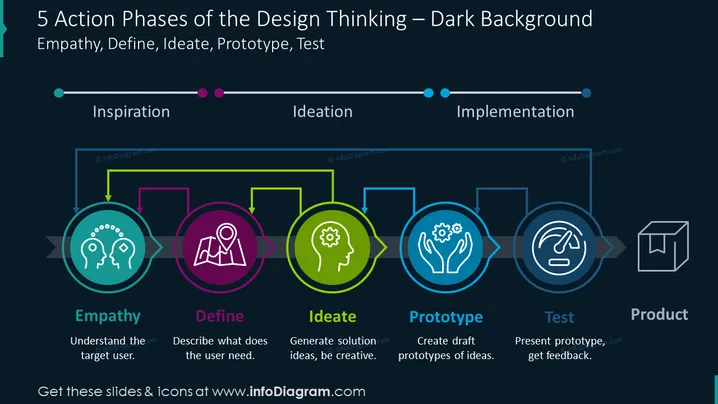
O slide ilustra as etapas do design thinking: Empatia, Definir, Idear, Prototipar e Testar, levando ao Produto final. A Empatia foca na compreensão do usuário-alvo. O Definir ajuda a descrever as necessidades do usuário. Idear é onde as ideias de solução são geradas e a criatividade é incentivada. Prototipar é a fase de criar esboços de ideias. Testar envolve apresentar o protótipo e obter feedback, contribuindo para o desenvolvimento do Produto final.
O slide tem uma aparência profissional e moderna, utilizando codificação de cores e ícones simples para organizar visualmente as informações. O design harmoniza a iconografia com breves descrições textuais, garantindo clareza e foco no fluxo do processo.



