
Your graphics add a nice touch to my presentations and I recently used them for one of my all-hands meetings. Your toolbox adds professionalism to my slides. Instead of using standard clipart.
Claude Jones, Director of Engineer, @Walmartlabs, USA
Your graphics add a nice touch to my presentations and I recently used them for one of my all-hands meetings. Your toolbox adds professionalism to my slides. Instead of using standard clipart.
Claude Jones, Director of Engineer, @Walmartlabs, USA
I needed a fresh look at some of my slides. I've tried to find a way to create a paintbrush effect, to underline, accentuate, add some color and the handwritten markers were just the things. Very easy to use, easy to size, change the color. It was an affordable, perfect solution and I'm happy to recommend it.
Anonymous, US
The crisp, clean look of the graphics, and the fact that it allowed me to easily edit and change the colors to match the template was my main reason for purchasing them.
Brandie Jenkins, E-learning Developer, USA
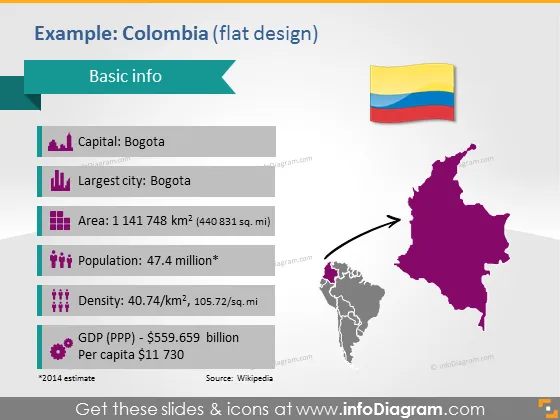
O slide do PowerPoint é intitulado "Exemplo: Colômbia (design plano)" e contém "Informações básicas" sobre a Colômbia. Ele lista a capital como Bogotá, que também é a maior cidade. A área é apresentada como 1.141.748 quilômetros quadrados, indicando a vastidão do país. A população é mencionada como 47,4 milhões, ressaltando um número significativo de habitantes. A densidade populacional é especificada como 40,74/km², proporcionando uma compreensão de como a população está espalhada. Além disso, detalha o PIB (PPP) como $559,659 bilhões e uma renda per capita de $11,730, apontando para indicadores econômicos.
O slide é estruturado com informações claras e concisas emparelhadas com ícones vibrantes e mapas para fornecer ênfase visual. O design plano garante que pareça moderno e facilmente legível.




