Before After Comparison Scribble 2 Text Boxes

Slide Content

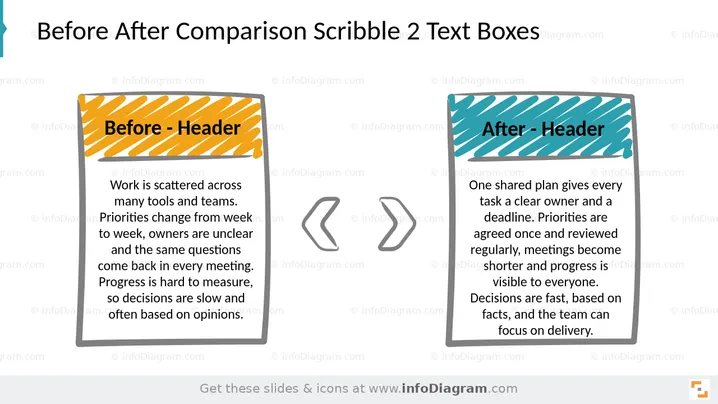
This slide compares a "Before" scenario, where work is scattered across many tools and teams, priorities change weekly, owners are unclear, and progress is hard to measure due to slow, opinion-based decisions, with an "After" scenario. The "After" state shows an improved situation with a shared plan, clear task owners and deadlines, regularly reviewed priorities, shorter meetings, visible progress, fast fact-based decisions, and a team focused on delivery.

Graphical Look

  • The slide title "Before After Comparison Scribble 2 Text Boxes" is in black font, centered at the top of the slide.
  • To the left of the slide title, there is a prominent teal vertical rectangular shape that spans the entire left edge of the slide, serving as a decorative element.
  • The main content area features two large rectangular text boxes, each with a hand-drawn, slightly irregular outline in dark gray, giving them a "scribble" effect.
  • The left text box has a header section filled with a hand-drawn, scribbled orange pattern, labeled "Before - Header" in black text.
  • The right text box has a header section filled with a hand-drawn, scribbled teal pattern, labeled "After - Header" in black text.
  • Between the two text boxes, there are two hand-drawn, dark gray chevron shapes, pointing away from each other, suggesting a comparison or transition.
  • Both text boxes contain placeholder text in black font, describing the "Before" and "After" states respectively.
  • The overall layout is clean and symmetrical, using a white background.

The slide has a playful, hand-drawn aesthetic, using irregular shapes and scribble fills to present a clear before-and-after comparison. The color contrast between the orange and teal headers effectively distinguishes the two states.

Use Cases

  • Project Management: To illustrate the benefits of implementing a new project methodology or tool by comparing the chaotic "before" state to the organized "after" state.
  • Process Improvement: To showcase the impact of optimizing a business process, detailing the inefficiencies prior to changes versus the improved efficiency afterward.
  • Change Management: To communicate the positive outcomes of an organizational change, contrasting current challenges with the desired future state.
  • Sales Presentations: To demonstrate the value proposition of a product or service by showing how it solves customer pain points ("before") and creates a better experience ("after").
Before After Comparison Scribble 2 Text Boxes

Before After Comparison Scribble 2 Text Boxes

Part of deckInfográficos desenhados à mão, diagramas e símbolos rabiscados (formas PPT)