

Your graphics add a nice touch to my presentations and I recently used them for one of my all-hands meetings. Your toolbox adds professionalism to my slides. Instead of using standard clipart.
Claude Jones, Director of Engineer, @Walmartlabs, USA

Your graphics add a nice touch to my presentations and I recently used them for one of my all-hands meetings. Your toolbox adds professionalism to my slides. Instead of using standard clipart.
Claude Jones, Director of Engineer, @Walmartlabs, USA
I needed a fresh look at some of my slides. I've tried to find a way to create a paintbrush effect, to underline, accentuate, add some color and the handwritten markers were just the things. Very easy to use, easy to size, change the color. It was an affordable, perfect solution and I'm happy to recommend it.
Anonymous, US
The crisp, clean look of the graphics, and the fact that it allowed me to easily edit and change the colors to match the template was my main reason for purchasing them.
Brandie Jenkins, E-learning Developer, USA
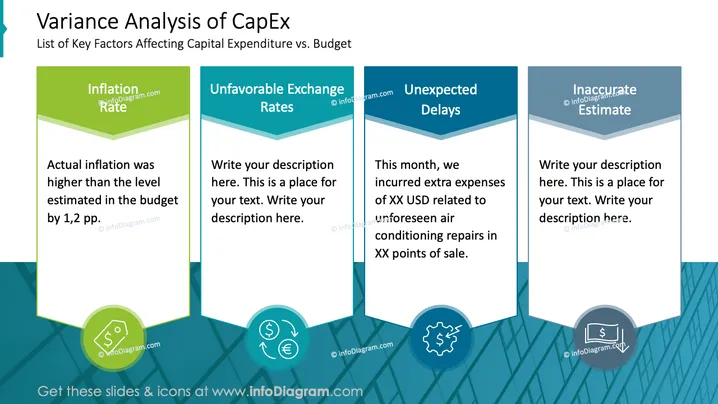
O slide do PowerPoint intitulado “Análise de Variação de CapEx” apresenta uma lista de quatro fatores-chave que afetam as despesas de capital versus o orçamento. "Taxa de Inflação" observa a inflação real sendo superior à estimativa orçamentária em 1,2 pontos percentuais. "Taxas de Câmbio Desfavoráveis", "Atrasos Inesperados" e "Estimativa Imprecisa" são marcadores de posição para descrição adicional. Cada fator indica potenciais razões para o desvio das despesas planejadas, sugerindo a necessidade de escrutínio e ajustes rigorosos.
O slide é visualmente claro e usa um gradiente de cor para cada seção para manter a consistência temática. Ele emprega ícones para representação gráfica dos conceitos discutidos.



